CAN Bus
Hardware
One CAN FD bus is integrated into AutomatePro with a max data rate of 8 Mbps.
Connector Pinout
- Connector
- Development Breakout Board
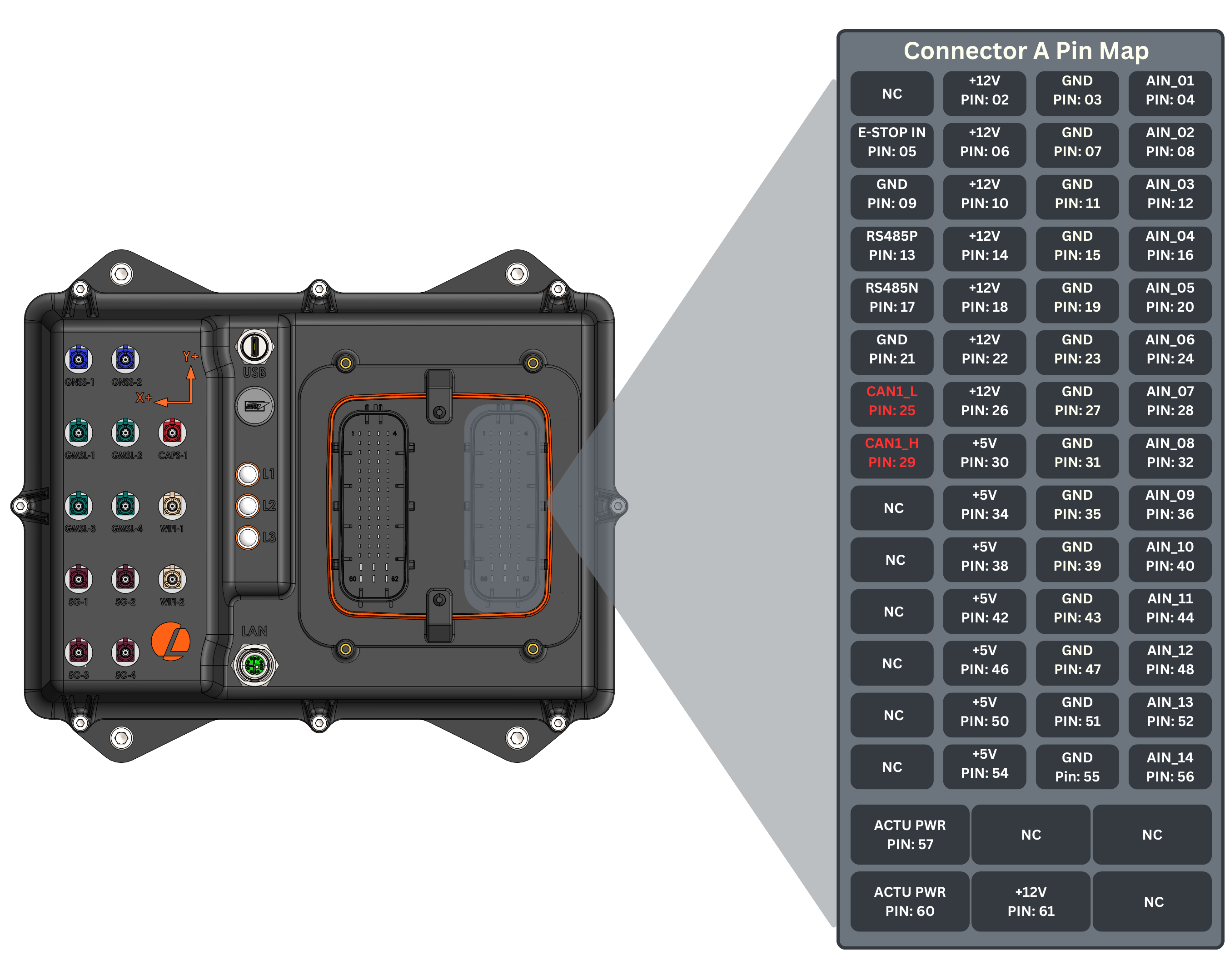
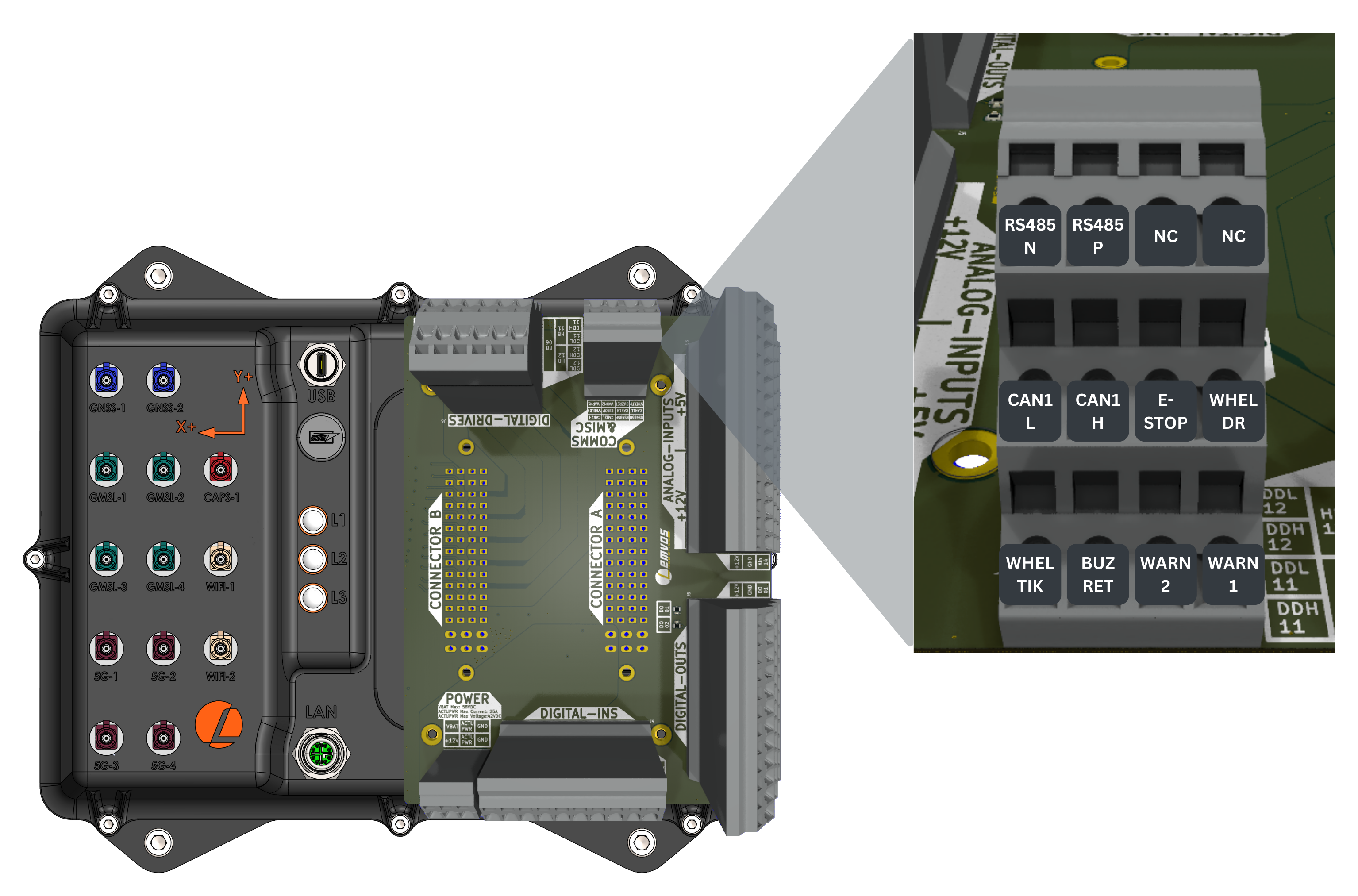
CAN Specifications
| Parameter | Value |
|---|---|
| Transceiver | TCAN3413DDFR |
| CAN FD | Yes |
| Max data rate | 8 Mbps |
| Integrated 120 Ω termination resistor | Yes |
| CAN H and L input protection | < ±58V |
Software
automatepro-start-can0.service brings can0 up at boot at 500 kbps with a transmit queue of 1000 frames.
To use the network, configure the interface properties. For instance, to set the network interface with a bus bit rate of 500 kbps, use the following command:
sudo ip link set can0 up type can bitrate 500000 berr-reporting on
Install CAN utilities for testing:
sudo apt-get install can-utils
This command transfers a packet to can0 with CAN ID 123 and data 'abcdabcd':
cansend can0 123#abcdabcd
This command receives packets from any CAN node connected to the bus:
candump -x any
For more information about the use of cansend, enter this command:
cansend --help
You can use other tools, such as cangen, for different filtering options.
Example
This example sends a frame with CAN ID 0x123 and a two-byte counter every second with can_sender and prints each frame can_receiver reads.
The programs are in the misc folder of the AutomatePro tutorials repository, and its README explains how to build and run them.
Each program takes the interface as its only argument: can0 on AutomatePro, or a virtual vcan0 interface to test without a bus.
Run the receiver and the sender in separate terminals.
The Python programs need python-can.
- Python
- C++
Sender: can_sender.py
import can
import sys
import time
import signal

running = True


def signal_handler(sig, frame):
    global running
    running = False
    print("\n[Sender] Stopping...")


signal.signal(signal.SIGINT, signal_handler)


def main():
    if len(sys.argv) < 2:
        print("Usage: python3 can_sender.py <interface>\nExample: python3 can_sender.py vcan0")
        sys.exit(1)

    interface = sys.argv[1]
    print(f"[Sender] Using interface: {interface}")

    try:
        bus = can.interface.Bus(channel=interface, interface='socketcan')
    except OSError as e:
        print(f"[Sender] Failed to connect to interface {interface}: {e}")
        sys.exit(1)

    counter = 0

    while running:
        data = [counter & 0xFF, (counter >> 8) & 0xFF]
        msg = can.Message(arbitration_id=0x123, data=data, is_extended_id=False)

        try:
            bus.send(msg)
            print(f"[Sender] Sent ID 0x{msg.arbitration_id:X} "
                  f"Data: {' '.join(str(b) for b in msg.data)}")
        except can.CanError as e:
            print(f"[Sender] Send failed: {e}")

        counter += 1
        time.sleep(1)

    bus.shutdown()
    print("[Sender] Closed.")


if __name__ == "__main__":
    main()
python3 can_sender.py can0
Receiver: can_receiver.py
import can
import sys
import signal

running = True


def signal_handler(sig, frame):
    global running
    running = False
    print("\n[Receiver] Stopping...")


signal.signal(signal.SIGINT, signal_handler)


def main():
    if len(sys.argv) < 2:
        print("Usage: python3 can_receiver.py <interface>\nExample: python3 can_receiver.py vcan0")
        sys.exit(1)

    interface = sys.argv[1]
    print(f"[Receiver] Listening on interface: {interface}")

    try:
        bus = can.interface.Bus(channel=interface, interface='socketcan')
    except OSError as e:
        print(f"[Receiver] Failed to connect to interface {interface}: {e}")
        sys.exit(1)

    while running:
        try:
            msg = bus.recv(timeout=1.0)
            if msg:
                print(f"[Receiver] Received ID 0x{msg.arbitration_id:X} "
                      f"Data: {' '.join(str(b) for b in msg.data)}")
        except can.CanError as e:
            print(f"[Receiver] Receive failed: {e}")

    bus.shutdown()
    print("[Receiver] Closed.")


if __name__ == "__main__":
    main()
python3 can_receiver.py can0
Sender: can_sender.cpp
#include <iostream>
#include <cstring>
#include <thread>
#include <chrono>
#include <csignal>
#include <cstdlib>
#include <net/if.h>
#include <sys/ioctl.h>
#include <sys/socket.h>
#include <linux/can.h>
#include <linux/can/raw.h>
#include <unistd.h>

volatile std::sig_atomic_t running = 1;

void signal_handler(int) {
    running = 0;
}

int main(int argc, char** argv) {
    if (argc < 2) {
        std::cerr << "Usage: ./can_sender <interface>\nExample: ./can_sender vcan0\n";
        return 1;
    }

    signal(SIGINT, signal_handler);

    std::string ifname = argv[1];

    int sock = socket(PF_CAN, SOCK_RAW, CAN_RAW);
    if (sock < 0) {
        perror("Sender socket");
        return 1;
    }

    int loopback = 1;
    setsockopt(sock, SOL_CAN_RAW, CAN_RAW_LOOPBACK, &loopback, sizeof(loopback));

    struct ifreq ifr {};
    std::strncpy(ifr.ifr_name, ifname.c_str(), IFNAMSIZ - 1);
    if (ioctl(sock, SIOCGIFINDEX, &ifr) < 0) {
        perror("SIOCGIFINDEX");
        return 1;
    }

    struct sockaddr_can addr {};
    addr.can_family = AF_CAN;
    addr.can_ifindex = ifr.ifr_ifindex;
    if (bind(sock, (struct sockaddr*)&addr, sizeof(addr)) < 0) {
        perror("Bind");
        return 1;
    }

    std::cout << "[Sender] Sending on interface: " << ifname << ". Press Ctrl+C to stop.\n";

    int counter = 0;
    while (running) {
        struct can_frame frame {};
        frame.can_id = 0x123;
        frame.can_dlc = 2;
        frame.data[0] = counter & 0xFF;
        frame.data[1] = (counter >> 8) & 0xFF;

        int bytes_sent = write(sock, &frame, sizeof(frame));
        if (bytes_sent == sizeof(frame)) {
            std::cout << "[Sender] Sent ID 0x" << std::hex << frame.can_id
                      << " Data: " << std::dec << static_cast<int>(frame.data[0])
                      << " " << static_cast<int>(frame.data[1]) << std::endl;
        } else {
            perror("[Sender] Write error");
        }

        ++counter;
        std::this_thread::sleep_for(std::chrono::seconds(1));
    }

    close(sock);
    std::cout << "[Sender] Closed.\n";
    return 0;
}
g++ -o can_sender can_sender.cpp
./can_sender can0
Receiver: can_receiver.cpp
#include <iostream>
#include <cstring>
#include <thread>
#include <csignal>
#include <cstdlib>
#include <net/if.h>
#include <sys/ioctl.h>
#include <sys/socket.h>
#include <linux/can.h>
#include <linux/can/raw.h>
#include <unistd.h>
#include <sys/select.h>

volatile std::sig_atomic_t running = 1;

void signal_handler(int) {
    running = 0;
}

int main(int argc, char** argv) {
    if (argc < 2) {
        std::cerr << "Usage: ./can_receiver <interface>\nExample: ./can_receiver vcan0\n";
        return 1;
    }

    signal(SIGINT, signal_handler);

    std::string ifname = argv[1];

    int sock = socket(PF_CAN, SOCK_RAW, CAN_RAW);
    if (sock < 0) {
        perror("Receiver socket");
        return 1;
    }

    int loopback = 1;
    setsockopt(sock, SOL_CAN_RAW, CAN_RAW_LOOPBACK, &loopback, sizeof(loopback));

    struct ifreq ifr {};
    std::strncpy(ifr.ifr_name, ifname.c_str(), IFNAMSIZ - 1);
    if (ioctl(sock, SIOCGIFINDEX, &ifr) < 0) {
        perror("SIOCGIFINDEX");
        return 1;
    }

    struct sockaddr_can addr {};
    addr.can_family = AF_CAN;
    addr.can_ifindex = ifr.ifr_ifindex;
    if (bind(sock, (struct sockaddr*)&addr, sizeof(addr)) < 0) {
        perror("Bind");
        return 1;
    }

    std::cout << "[Receiver] Listening on interface: " << ifname << ". Press Ctrl+C to stop.\n";

    struct can_frame frame;
    fd_set read_fds;
    struct timeval timeout;

    while (running) {
        FD_ZERO(&read_fds);
        FD_SET(sock, &read_fds);
        timeout.tv_sec = 1;
        timeout.tv_usec = 0;

        int ret = select(sock + 1, &read_fds, nullptr, nullptr, &timeout);
        if (ret > 0 && FD_ISSET(sock, &read_fds)) {
            int nbytes = read(sock, &frame, sizeof(frame));
            if (nbytes > 0) {
                std::cout << "[Receiver] Received ID 0x" << std::hex << frame.can_id << " Data: ";
                for (int i = 0; i < frame.can_dlc; ++i)
                    std::cout << std::dec << static_cast<int>(frame.data[i]) << " ";
                std::cout << std::dec << std::endl;
            } else {
                perror("[Receiver] Read error");
            }
        }
    }

    close(sock);
    std::cout << "[Receiver] Closed.\n";
    return 0;
}
g++ -o can_receiver can_receiver.cpp
./can_receiver can0
Troubleshooting
Loopback test
You can perform a loopback test to determine whether the controller is working.
Ensure the CAN drivers are loaded. To check whether the drivers are loaded, use the following command:
lsmod | grep mttcan
If the drivers are not loaded, enter this command:
sudo modprobe mttcan
To perform a loopback test, run the following commands:
sudo ip link set can0 type can bitrate 500000 loopback on
sudo ip link set can0 up
candump can0 &
cansend can0 123#abcdabcd
If the loopback test is successful, the last command displays this:
can0 123 [4] AB CD AB CD
can0 123 [4] AB CD AB CD
Other Methods
Additional debugging techniques to consider:
-
If a loopback test shows that the controller is working correctly and you still cannot send or receive packets, try reconnecting the transceiver and confirm that the connections are correct.
-
Check if the
mttcandriver is loaded. -
Connect an oscilloscope to analyze the bus signal integrity and verify proper operation.
-
If the device logs a
No buffer space availablemessage during send, enter this command to use the polling mechanism:cangen -L 8 can0 -p 1000