IO Controller
Hardware
The AutomatePro is equipped with comprehensive onboard current and voltage monitoring systems. This reduces the need for external sensors and enables effective downstream monitoring, facilitating early detection of potential issues. The monitored power supply diagram is shown below.
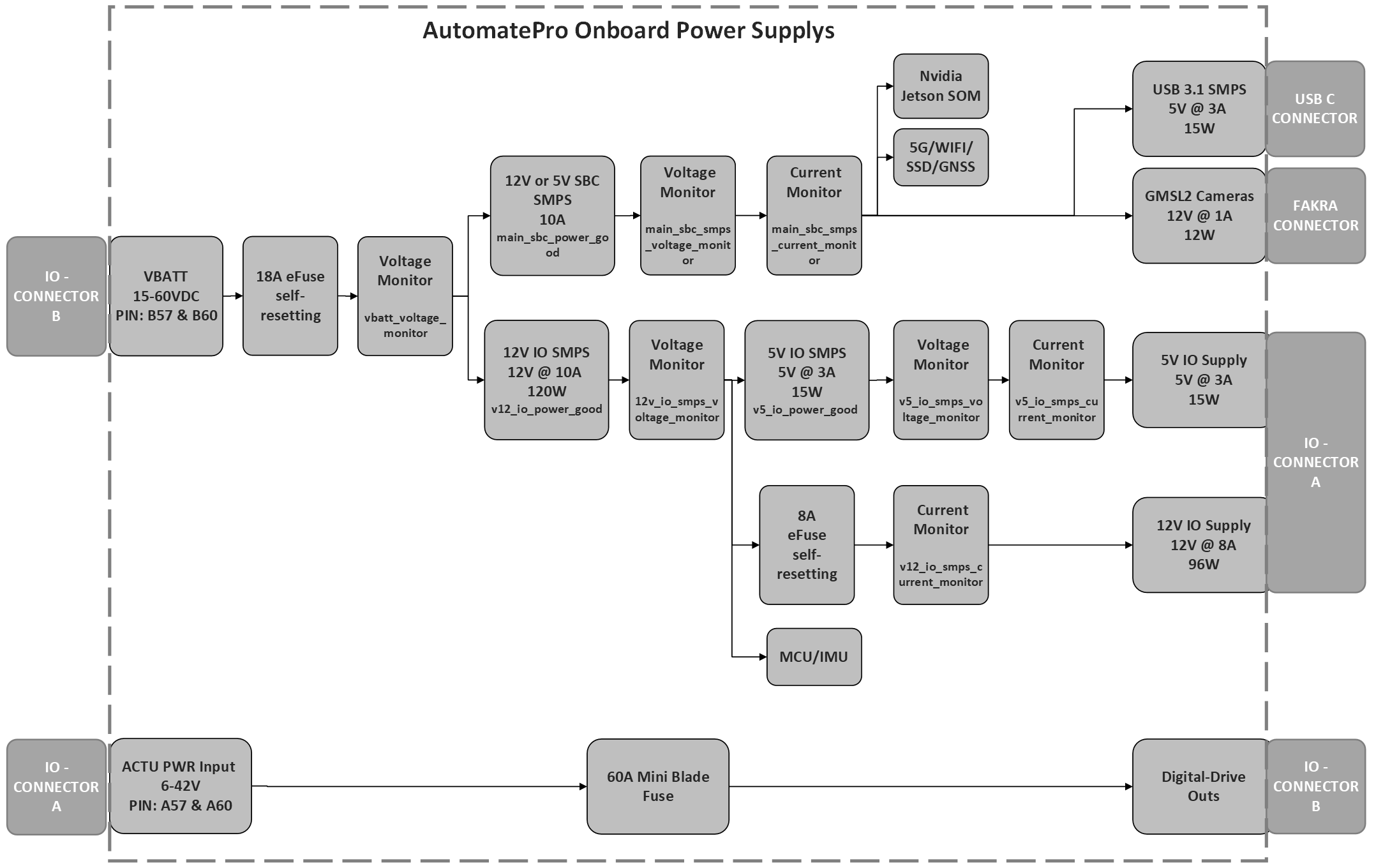
ROS API
Node: io_controller
The IO controller topics and services use the default reliable QoS.
Publishers
| Topic | Type | Description |
|---|---|---|
/diagnostic/io_controller_hw | automatepro_interfaces/msg/IOControllerDiagnostic | Hardware and board diagnostics, including rail voltages and currents, power-good states, digital-drive faults, and board temperature. Published every second; the values are smoothed with an exponential moving average (factor 0.8). |
/diagnostic/io_controller_fw | automatepro_interfaces/msg/IOFirmwareDiagnostic | Firmware diagnostics, including controller uptime and fault codes. |
IOControllerDiagnostic publishes these fields:
| Field | Type | Description |
|---|---|---|
header | std_msgs/Header | Message timestamp; the frame ID is io. |
vbatt_voltage_monitor | float32 | Battery voltage in V. |
v12_io_smps_current_monitor | float32 | 12V IO SMPS current in A. |
v12_io_smps_voltage_monitor | float32 | 12V IO SMPS voltage in V. |
main_sbc_smps_current_monitor | float32 | Main SBC SMPS current in A. |
main_sbc_smps_voltage_monitor | float32 | Main SBC SMPS voltage in V. |
v5_io_smps_voltage_monitor | float32 | 5V IO SMPS voltage in V. |
v5_io_smps_current_monitor | float32 | 5V IO SMPS current in A. |
amp_total_power_monitor | float32 | Main SBC power (main SBC SMPS voltage times current) in W. |
v12_io_power_good | bool | 12V IO rail power-good state. |
v5_io_power_good | bool | 5V IO rail power-good state. |
v3_3_io_power_good | bool | 3.3V IO rail power-good state. |
main_sbc_power_good | bool | Main SBC rail power-good state. |
v5_sbc_power_good | bool | 5V SBC rail power-good state. |
v3_3_sbc_power_good | bool | 3.3V SBC rail power-good state. |
v1_8_sbc_power_good | bool | 1.8V SBC rail power-good state. |
digital_drive_fault_1 | bool | Digital-drive fault 1 state. |
digital_drive_fault_2 | bool | Digital-drive fault 2 state. |
digital_drive_fault_3 | bool | Digital-drive fault 3 state. |
digital_drive_fault_4 | bool | Digital-drive fault 4 state. |
board_temp | int8 | Board temperature in degrees Celsius. |
IOFirmwareDiagnostic publishes these fields:
| Field | Type | Description |
|---|---|---|
header | std_msgs/Header | Message timestamp; the frame ID is io. |
uptime | uint32 | IO controller firmware uptime in seconds. |
fault_code | uint8[10] | Firmware fault-code array. |
Parameters
All parameters are read-only and report the hardware and firmware of the IO controller.
| Parameter | Type | Description |
|---|---|---|
hardware.version.major | int | Hardware major version. |
hardware.version.minor | int | Hardware minor version. |
hardware.uuid_1 to hardware.uuid_4 | int | Hardware unique ID, in four parts. |
hardware.config | int | Hardware configuration. |
firmware.version.major | int | Firmware major version. |
firmware.version.minor | int | Firmware minor version. |
firmware.version.patch | int | Firmware patch version. |
Developer Notes: IO controller CLI
The installer provides /usr/local/bin/io_controller, which controls the IO controller MCU from the compute module:
| Command | Action |
|---|---|
io_controller reset | Resets the IO controller MCU. automatepro-io-agent.service runs it before each start. |
io_controller normal_mode | Sets the MCU to normal mode and resets it. |
io_controller flashing_mode | Sets the MCU to flashing mode. |
io_controller flash <path/to/hex> [options] | Sets flashing mode, writes the firmware hex file over UART, and returns the MCU to normal mode. |
io_controller install <path/to/tgz> | Installs the Renesas flash programmer CLI from a .tgz archive into /opt/automatepro/bin. |
Example
This example prints diagnostic information about the IO controller by subscribing to the /diagnostic/io_controller_hw topic.
The tutorial package is available in the AutomatePro tutorials repository, and its README explains how to build and run the examples.
- Python
- C++
Source: io_controller.py
import rclpy
from rclpy.executors import ExternalShutdownException
from rclpy.node import Node
from automatepro_interfaces.msg import IOControllerDiagnostic


class IOControllerDiagnosticSubscriber(Node):

    def __init__(self):
        super().__init__('io_controller_diagnostic_subscriber')
        self.subscription = self.create_subscription(
            IOControllerDiagnostic,
            '/diagnostic/io_controller_hw',
            self.listener_callback,
            10)

    def listener_callback(self, msg):
        self.get_logger().info('Received IOControllerDiagnostic message:')
        self.get_logger().info(f'Battery Voltage: {msg.vbatt_voltage_monitor:.3f} V')
        self.get_logger().info(f'12V IO SMPS Current: {msg.v12_io_smps_current_monitor:.3f} A')
        self.get_logger().info(f'12V IO SMPS Voltage: {msg.v12_io_smps_voltage_monitor:.3f} V')
        self.get_logger().info(f'Main SBC SMPS Current: {msg.main_sbc_smps_current_monitor:.3f} A')
        self.get_logger().info(f'Main SBC SMPS Voltage: {msg.main_sbc_smps_voltage_monitor:.3f} V')
        self.get_logger().info(f'5V IO SMPS Voltage: {msg.v5_io_smps_voltage_monitor:.3f} V')
        self.get_logger().info(f'5V IO SMPS Current: {msg.v5_io_smps_current_monitor:.3f} A')
        self.get_logger().info(f'Main SBC Power: {msg.amp_total_power_monitor:.3f} W')
        self.get_logger().info(f'12V IO Power Good: {msg.v12_io_power_good}')
        self.get_logger().info(f'5V IO Power Good: {msg.v5_io_power_good}')
        self.get_logger().info(f'3.3V IO Power Good: {msg.v3_3_io_power_good}')
        self.get_logger().info(f'Main SBC Power Good: {msg.main_sbc_power_good}')
        self.get_logger().info(f'5V SBC Power Good: {msg.v5_sbc_power_good}')
        self.get_logger().info(f'3.3V SBC Power Good: {msg.v3_3_sbc_power_good}')
        self.get_logger().info(f'1.8V SBC Power Good: {msg.v1_8_sbc_power_good}')
        self.get_logger().info(f'Motor Drive Fault 1: {msg.digital_drive_fault_1}')
        self.get_logger().info(f'Motor Drive Fault 2: {msg.digital_drive_fault_2}')
        self.get_logger().info(f'Motor Drive Fault 3: {msg.digital_drive_fault_3}')
        self.get_logger().info(f'Motor Drive Fault 4: {msg.digital_drive_fault_4}')
        self.get_logger().info(f'Board Temperature: {msg.board_temp} °C')


def main(args=None):
    rclpy.init(args=args)
    node = IOControllerDiagnosticSubscriber()
    try:
        rclpy.spin(node)
    except (KeyboardInterrupt, ExternalShutdownException):
        pass
    finally:
        node.destroy_node()
        rclpy.try_shutdown()


if __name__ == '__main__':
    main()
Run the node using the following command:
ros2 run automatepro_python_tutorials io_controller_diagnostic_node
Source: io_controller.cpp
#include <rclcpp/rclcpp.hpp>
#include <automatepro_interfaces/msg/io_controller_diagnostic.hpp>

class IOControllerDiagnosticSubscriber : public rclcpp::Node
{
public:
  IOControllerDiagnosticSubscriber()
  : Node("io_controller_diagnostic_subscriber")
  {
    subscription_ = this->create_subscription<automatepro_interfaces::msg::IOControllerDiagnostic>(
      "/diagnostic/io_controller_hw", 10,
      std::bind(&IOControllerDiagnosticSubscriber::listener_callback, this, std::placeholders::_1));
  }

private:
  void listener_callback(const automatepro_interfaces::msg::IOControllerDiagnostic::SharedPtr msg)
  const
  {
    RCLCPP_INFO(this->get_logger(), "Received IOControllerDiagnostic message");
    RCLCPP_INFO(this->get_logger(), "Battery Voltage: %.3f V", msg->vbatt_voltage_monitor);
    RCLCPP_INFO(
      this->get_logger(), "12V IO SMPS Current: %.3f A",
      msg->v12_io_smps_current_monitor);
    RCLCPP_INFO(
      this->get_logger(), "12V IO SMPS Voltage: %.3f V",
      msg->v12_io_smps_voltage_monitor);
    RCLCPP_INFO(
      this->get_logger(), "Main SBC SMPS Current: %.3f A", msg->main_sbc_smps_current_monitor);
    RCLCPP_INFO(
      this->get_logger(), "Main SBC SMPS Voltage: %.3f V", msg->main_sbc_smps_voltage_monitor);
    RCLCPP_INFO(this->get_logger(), "5V IO SMPS Voltage: %.3f V", msg->v5_io_smps_voltage_monitor);
    RCLCPP_INFO(this->get_logger(), "5V IO SMPS Current: %.3f A", msg->v5_io_smps_current_monitor);
    RCLCPP_INFO(this->get_logger(), "Main SBC Power: %.3f W", msg->amp_total_power_monitor);
    RCLCPP_INFO(this->get_logger(), "12V IO Power Good: %d", msg->v12_io_power_good);
    RCLCPP_INFO(this->get_logger(), "5V IO Power Good: %d", msg->v5_io_power_good);
    RCLCPP_INFO(this->get_logger(), "3.3V IO Power Good: %d", msg->v3_3_io_power_good);
    RCLCPP_INFO(this->get_logger(), "Main SBC Power Good: %d", msg->main_sbc_power_good);
    RCLCPP_INFO(this->get_logger(), "5V SBC Power Good: %d", msg->v5_sbc_power_good);
    RCLCPP_INFO(this->get_logger(), "3.3V SBC Power Good: %d", msg->v3_3_sbc_power_good);
    RCLCPP_INFO(this->get_logger(), "1.8V SBC Power Good: %d", msg->v1_8_sbc_power_good);
    RCLCPP_INFO(this->get_logger(), "Motor Drive Fault 1: %d", msg->digital_drive_fault_1);
    RCLCPP_INFO(this->get_logger(), "Motor Drive Fault 2: %d", msg->digital_drive_fault_2);
    RCLCPP_INFO(this->get_logger(), "Motor Drive Fault 3: %d", msg->digital_drive_fault_3);
    RCLCPP_INFO(this->get_logger(), "Motor Drive Fault 4: %d", msg->digital_drive_fault_4);
    RCLCPP_INFO(this->get_logger(), "Board Temperature: %d °C", msg->board_temp);
  }

  rclcpp::Subscription<automatepro_interfaces::msg::IOControllerDiagnostic>::SharedPtr
    subscription_;
};

int main(int argc, char * argv[])
{
  rclcpp::init(argc, argv);
  auto node = std::make_shared<IOControllerDiagnosticSubscriber>();
  rclcpp::spin(node);
  rclcpp::shutdown();
  return 0;
}
Run the node using the following command:
ros2 run automatepro_cpp_tutorials io_controller_diagnostic_node