E-STOP
Hardware
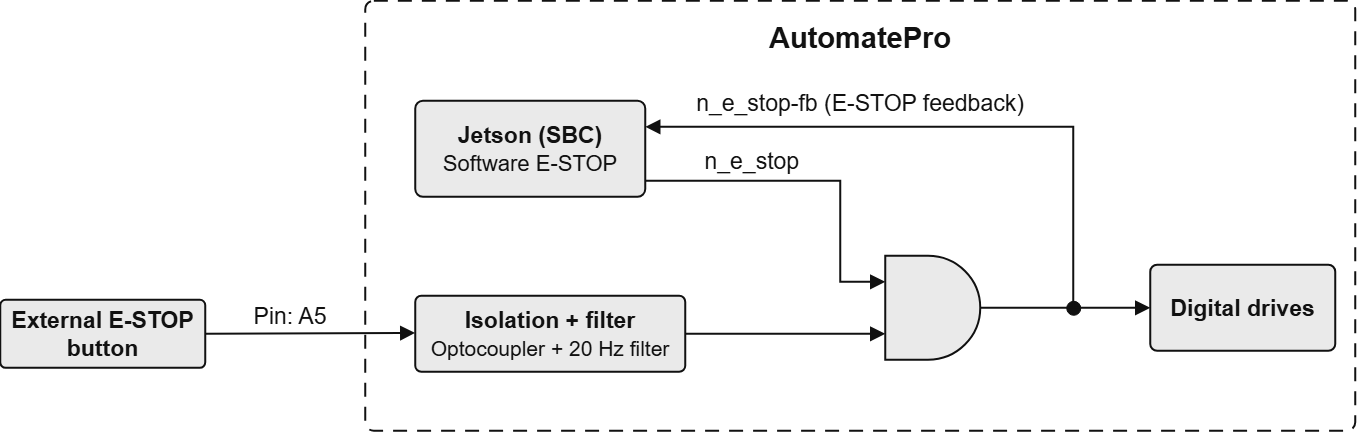
The AutomatePro features an onboard E-STOP input, allowing it to read the state of an external E-STOP. While the E-STOP state disables the Digital Drives, its primary function is as an input and it has not been designed to meet any functional safety standards.
The E-STOP input is located on Pin A5 (main connector A) and requires an input voltage ranging from 5-24VDC. If the E-STOP pin does not need to be sensed, it must be connected to the onboard 12V_IO supply.
Software Interface
E-STOP is a hardware function: the E_STOP signal gates the digital-drive drivers directly.
-
Release E-STOP:
gpioset --mode=exit n_e_stop=1automatepro-io-agent.servicereleases the software E-STOP each time it starts. -
Read E-STOP status:
gpioget n_e_stop-fbReturns
0when the E-STOP is active (button pressed, digital drives disabled) and1when the E-STOP is released (digital drives enabled).