Analog In
Hardware
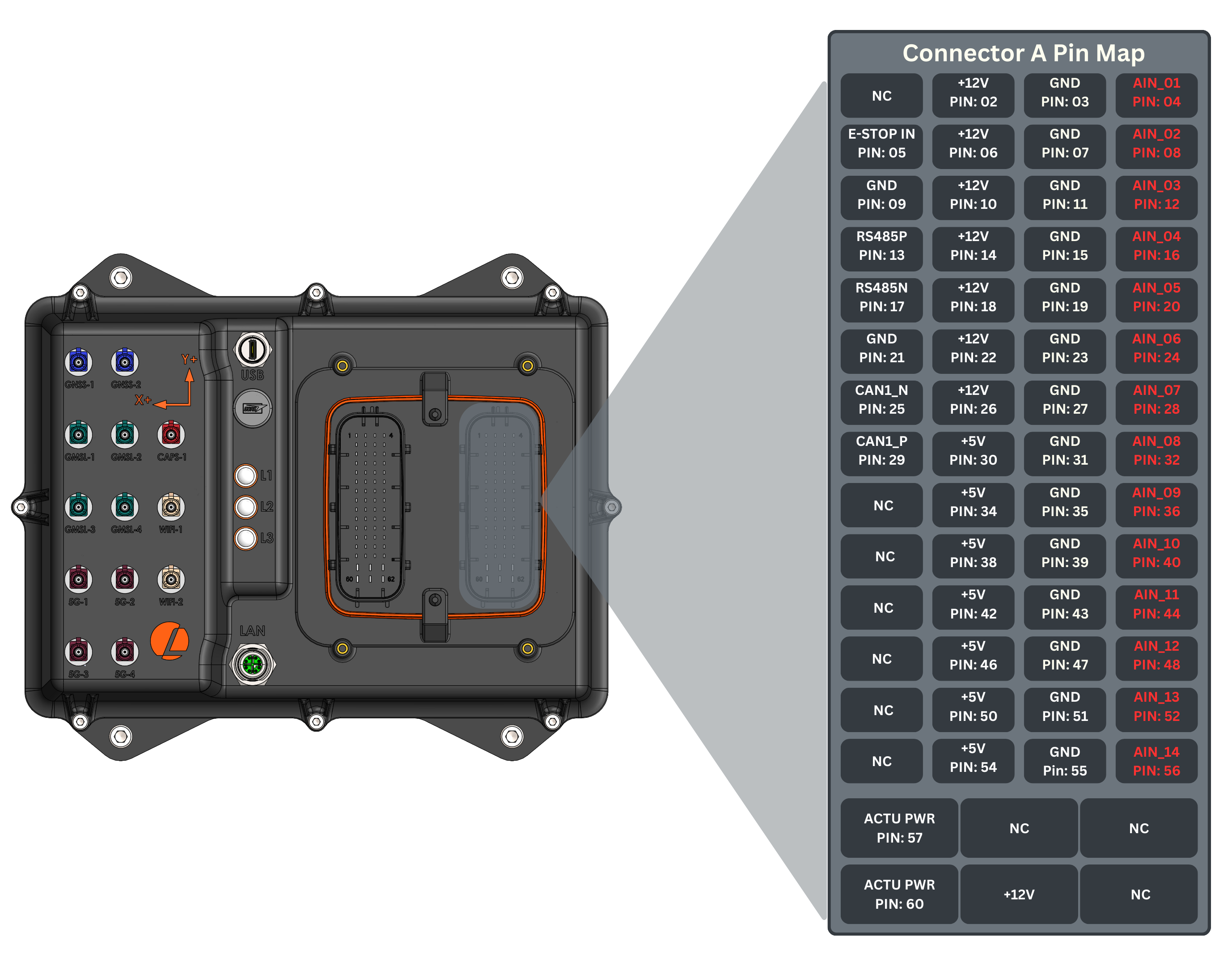
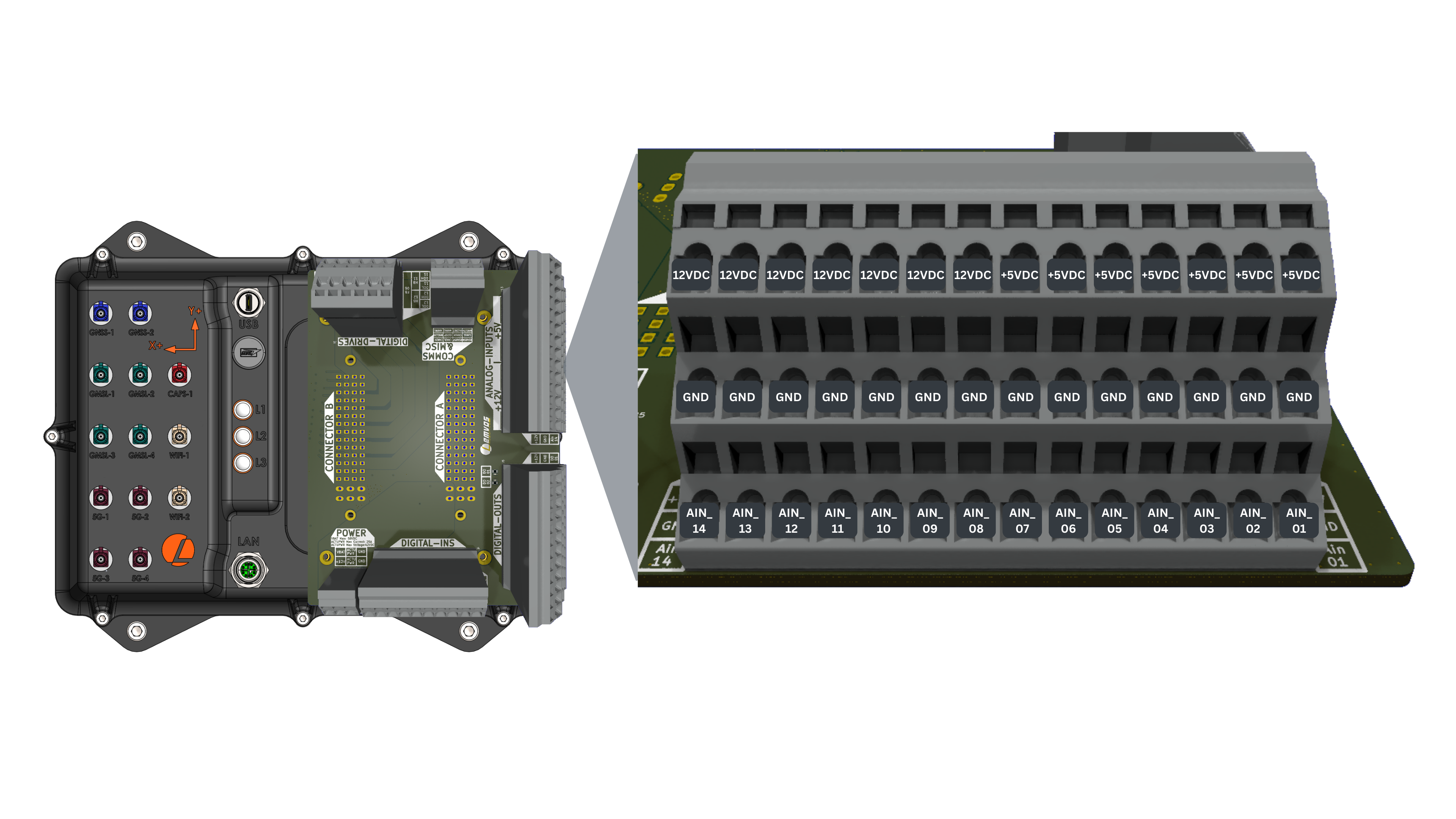
AutomatePro comes with 14x analog inputs for measuring a range of different analog sensor types, such as automotive or industrial sensors.
Connector Pinout
- Connector
- Development Breakout Board
Analog Input Specifications
| Parameter | Value |
|---|---|
| Voltage Input Range | 0-10V (optional 4-20mA input or integrated automotive 5V pull-up on request) |
| Sample Rate | 33 Hz |
| Measurement Resolution | 2.489 mV/increment (12-bit) |
| Number of Inputs | 14 |
ROS API
Publishers
| Topic | Type | Description |
|---|---|---|
/io/ain | automatepro_interfaces/msg/AnalogIn | Contains the states of the analog inputs. AutomatePro supports 14 analog input pins. Each input pin is referred to as ain_XX, where XX is the pin number, ranging from 01 to 14. Input Pins: ain_01 - ain_14 DataType: int16 Unit: user-defined (default: mV) Min: -32768 Max: 32767 Sample Rate: 33 Hz |
Each message includes a timestamp in the header, indicating when the IO-Controller collected the data. It is recommended to use this timestamp for any time-sensitive data processing, as it ensures that transport delays are accounted for, providing accurate timing for downstream operations.
Configuration
Analog input channels can be configured with gain, offset, and filter parameters via the IO Config service for precise scaling, calibration, and signal smoothing.
Default Configuration: Unless reconfigured, all analog inputs use the following defaults:
- Gain: 1.0
- Offset: 0.0
- Filter Coefficient: 1.0 (no filtering)
Raw millivolt (mV) values are published without any signal processing applied.
Services
| Service | Type | Description |
|---|---|---|
/io/config | automatepro_interfaces/srv/IOConfig | Configure analog input parameters including gain, offset, and exponential moving average filter. Written values are saved to the IO controller flash and persist across power cycles. Request Parameters: flag: DataType: uint8 0 for read, 1 for write key: DataType: uint16 Key associated with the value to be changed (0-65535) val: DataType: float32 Corresponding value for the key Response Parameters: ret_code: DataType: uint16 0 on success, 1 on failure or an invalid key or flag ret_val: DataType: float32 Returns the set value if successful |
Configuration Keys
The analog input configuration uses keys in the format 1XXY where:
XXis the analog input index (01-14)Yis the parameter type:0for gain (m)1for offset (c)2for exponential moving average filter9to reset the input to the default configuration
Configuration Parameters
Set Gain (m):
- Key:
1XX0where XX is the AIN index (01-14) - Value: Desired gain value as float
- Example: Key
1010sets gain for AIN_01
Set Offset (c):
- Key:
1XX1where XX is the AIN index (01-14) - Value: Desired offset value as float
- Example: Key
1011sets offset for AIN_01
Set Exponential Moving Average Filter:
- Key:
1XX2where XX is the AIN index (01-14) - Value: Filter coefficient (0.0 - 1.0)
1.0= No filtering- Lower values = More filtering (slower response)
- Example: Key
1012sets filter for AIN_01
Reset to Defaults:
- Key:
1XX9where XX is the AIN index (01-14) - Resets gain, offset, and filter of that input to the default configuration and saves it
- Example: Key
1019resets AIN_01
-
Scaling and Calibration:
Scaled_Value = (Raw_Value × Gain) + Offset -
Exponential Moving Average Filter:
Final_Value = Previous_Value × (1 - α) + Scaled_Value × αWhere
α(alpha) is the filter coefficient (0.0 - 1.0)
The final calculated value (Raw_Value * Gain) + Offset must not exceed the int16 range (-32768 to 32767).
Results above 32767 are clamped to 32767.
Configuration Example
- CLI
# Set gain for AIN_01 to 2.0
ros2 service call /io/config automatepro_interfaces/srv/IOConfig "{flag: 1, key: 1010, val: 2.0}"

# Set offset for AIN_01 to 100.0
ros2 service call /io/config automatepro_interfaces/srv/IOConfig "{flag: 1, key: 1011, val: 100.0}"

# Set filter coefficient for AIN_01 to 0.9
ros2 service call /io/config automatepro_interfaces/srv/IOConfig "{flag: 1, key: 1012, val: 0.9}"
Example
This example prints the analog input values at most once per second by subscribing to the /io/ain topic.
The tutorial package is available in the AutomatePro tutorials repository, and its README explains how to build and run the examples.
- Python
- C++
Source: analog_in.py
import rclpy
from rclpy.executors import ExternalShutdownException
from rclpy.node import Node
from automatepro_interfaces.msg import AnalogIn

LOG_PERIOD_S = 1.0


class AnalogInSubscriber(Node):

    def __init__(self):
        super().__init__('analog_in_subscriber')
        self.subscription = self.create_subscription(
            AnalogIn,
            '/io/ain',
            self.subscriber_callback,
            10)

    def subscriber_callback(self, msg):
        self.get_logger().info(
            f'Received AnalogIn message:\n'
            f'AIN_01: {msg.ain_01}\nAIN_02: {msg.ain_02}\nAIN_03: {msg.ain_03}\n'
            f'AIN_04: {msg.ain_04}\nAIN_05: {msg.ain_05}\nAIN_06: {msg.ain_06}\n'
            f'AIN_07: {msg.ain_07}\nAIN_08: {msg.ain_08}\nAIN_09: {msg.ain_09}\n'
            f'AIN_10: {msg.ain_10}\nAIN_11: {msg.ain_11}\nAIN_12: {msg.ain_12}\n'
            f'AIN_13: {msg.ain_13}\nAIN_14: {msg.ain_14}',
            throttle_duration_sec=LOG_PERIOD_S)


def main(args=None):
    rclpy.init(args=args)
    node = AnalogInSubscriber()
    try:
        rclpy.spin(node)
    except (KeyboardInterrupt, ExternalShutdownException):
        pass
    finally:
        node.destroy_node()
        rclpy.try_shutdown()


if __name__ == '__main__':
    main()
Run the node using the following command:
ros2 run automatepro_python_tutorials analog_in_node
Source: analog_in.cpp
#include <rclcpp/rclcpp.hpp>
#include <automatepro_interfaces/msg/analog_in.hpp>

class AnalogInSubscriber : public rclcpp::Node
{
public:
  AnalogInSubscriber()
  : Node("analog_in_subscriber")
  {
    subscription_ = this->create_subscription<automatepro_interfaces::msg::AnalogIn>(
      "/io/ain", 10,
      std::bind(&AnalogInSubscriber::listener_callback, this, std::placeholders::_1));
  }

private:
  static constexpr int kLogPeriodMs = 1000;

  void listener_callback(const automatepro_interfaces::msg::AnalogIn::SharedPtr msg)
  {
    RCLCPP_INFO_THROTTLE(
      this->get_logger(), *this->get_clock(), kLogPeriodMs,
      "Received AnalogIn message:\n"
      "AIN_01: %d\nAIN_02: %d\nAIN_03: %d\n"
      "AIN_04: %d\nAIN_05: %d\nAIN_06: %d\n"
      "AIN_07: %d\nAIN_08: %d\nAIN_09: %d\n"
      "AIN_10: %d\nAIN_11: %d\nAIN_12: %d\n"
      "AIN_13: %d\nAIN_14: %d",
      msg->ain_01, msg->ain_02, msg->ain_03,
      msg->ain_04, msg->ain_05, msg->ain_06,
      msg->ain_07, msg->ain_08, msg->ain_09,
      msg->ain_10, msg->ain_11, msg->ain_12,
      msg->ain_13, msg->ain_14);
  }

  rclcpp::Subscription<automatepro_interfaces::msg::AnalogIn>::SharedPtr subscription_;
};

int main(int argc, char * argv[])
{
  rclcpp::init(argc, argv);
  rclcpp::spin(std::make_shared<AnalogInSubscriber>());
  rclcpp::shutdown();
  return 0;
}
Run the node using the following command:
ros2 run automatepro_cpp_tutorials analog_in_node