Digital In
Hardware
The AutomatePro comes with 10x digital inputs for checking the binary state of external systems. It is designed to work with a wide range of different sensors and switches.
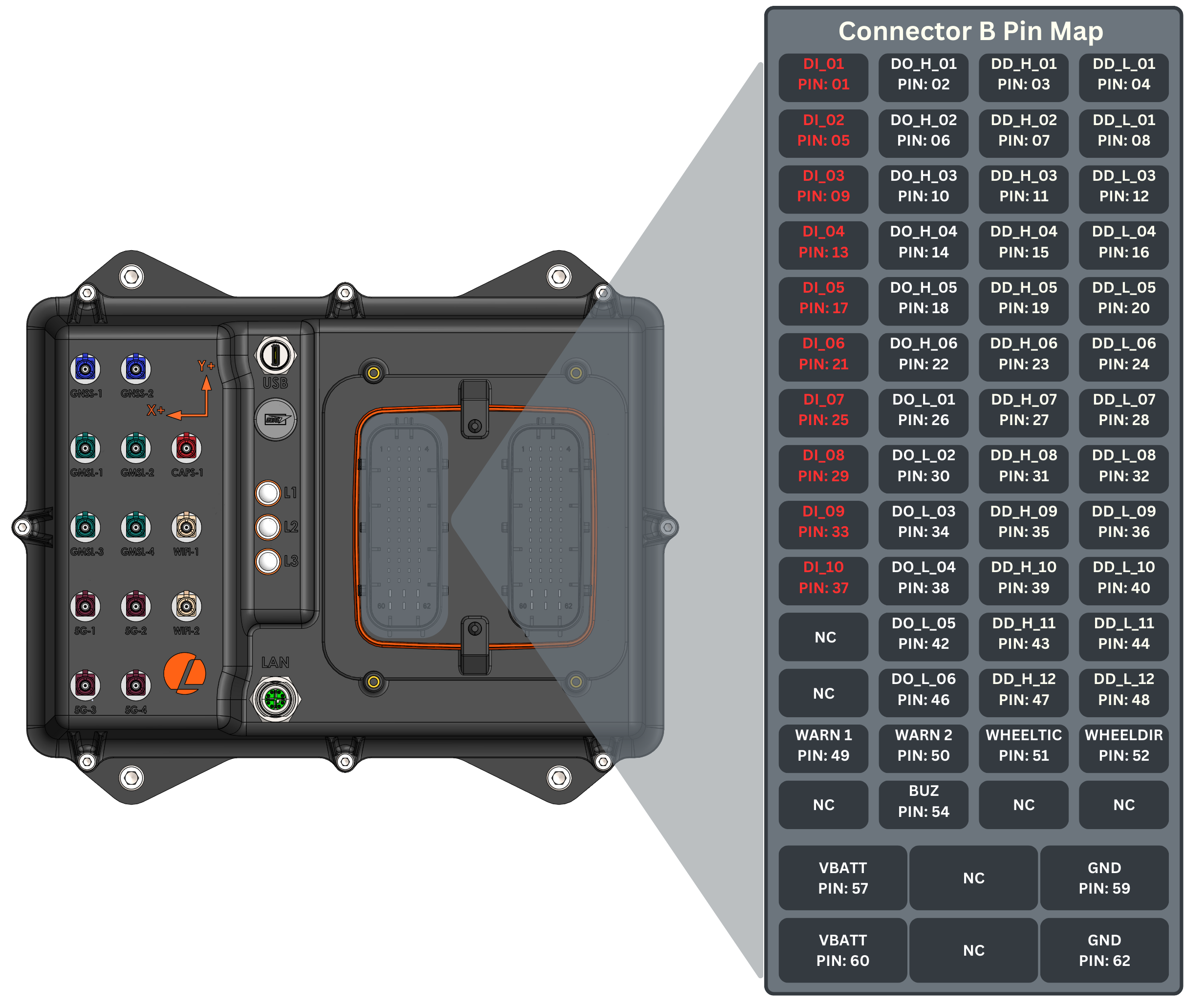
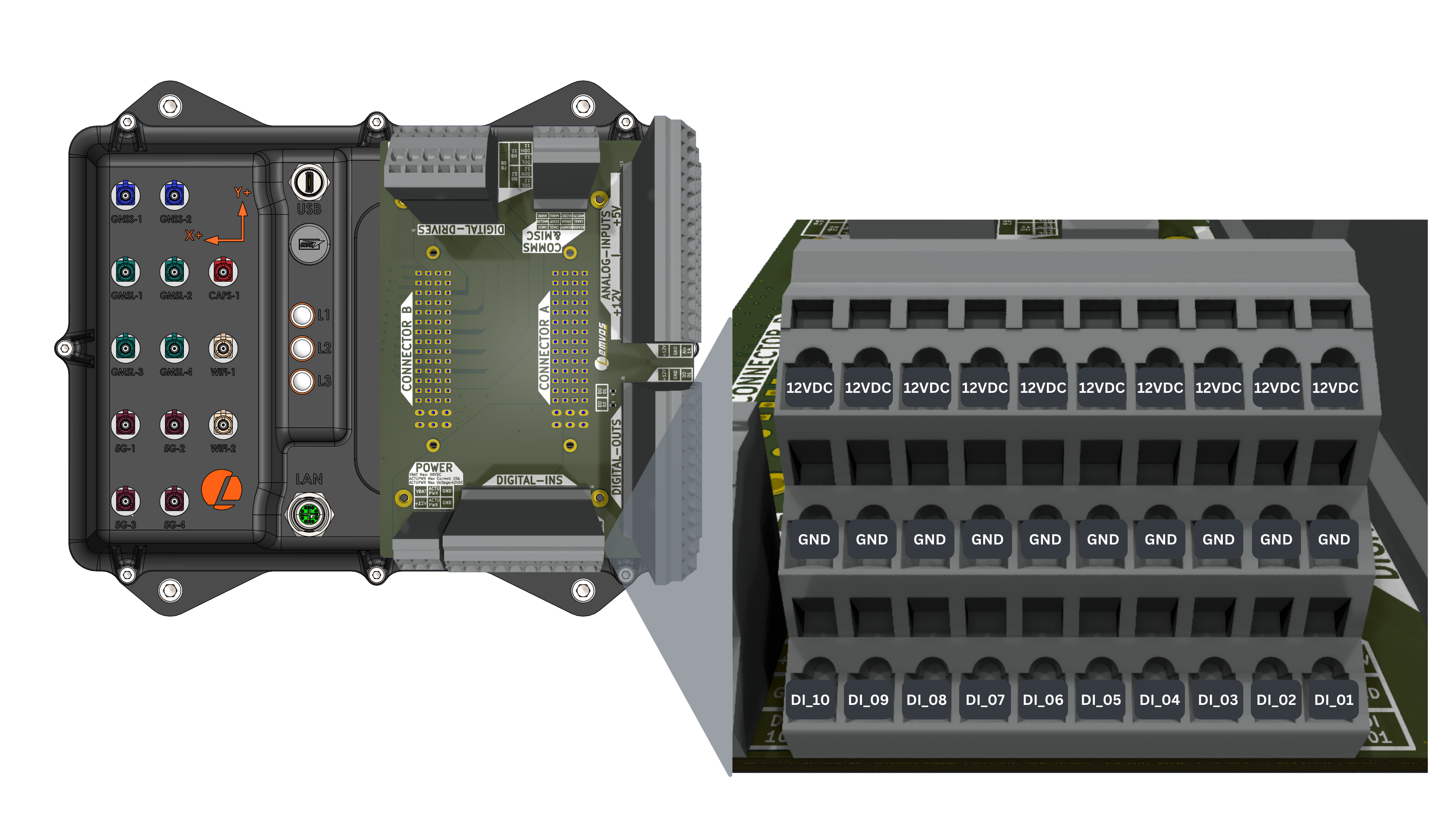
Connector Pinout
- Connector
- Development Breakout Board
Digital Input Specifications
| Parameter | Value |
|---|---|
| High Voltage State | 5-24V |
| Low Voltage State | <2V |
| Input Impedance | 2kΩ |
| Sample Rate | 33 Hz |
| Number of Inputs | 10 |
ROS API
Publishers
| Topic | Type | Description |
|---|---|---|
/io/din | automatepro_interfaces/msg/DigitalIn | Contains the states of the digital inputs. Published once when the IO controller starts, then only on state change or when requested. AutomatePro supports 10 digital input pins. Each input pin is referred to as din_XX, where XX is the pin number, ranging from 01 to 10. Input Pins: din_01-din_10 DataType: bool Inputs are checked approximately every 30 ms. |
Services
| Service | Type | Description |
|---|---|---|
/io/din/request | automatepro_interfaces/srv/ReqDigitalIn | Request to send the current state of the digital inputs. When requested, current states will be published to /io/din. |
/io/config | automatepro_interfaces/srv/IOConfig | Configure digital input parameters such as state inversion. Written values are saved to the IO controller flash and persist across power cycles. Request Parameters: flag: DataType: uint8 0 for read, 1 for write key: DataType: uint16 Key associated with the value to be changed (0-65535) val: DataType: float32 Corresponding value for the key Response Parameters: ret_code: DataType: uint16 0 on success, 1 on failure or an invalid key or flag ret_val: DataType: float32 Returns the set value if successful |
Configuration Keys
The digital input configuration uses keys in the format 3XXY where:
XXis the digital input index (01-10)Yis the parameter type:0: State Inversion
Configuration Parameters
Set State Inversion:
- Key:
3XX0where XX is the DIN index (01-10) - Value: 0 for non-inverted, 1 for inverted
- Example: Key
3010sets inversion for DIN_01
It is recommended to request the states of the digital inputs by calling the service,
immediately after subscribing to /io/din to ensure you have the most up-to-date information.
Example
This example requests the current state of the digital inputs through the /io/din/request service and prints each change by subscribing to the /io/din topic.
The tutorial package is available in the AutomatePro tutorials repository, and its README explains how to build and run the examples.
- Python
- C++
Source: digital_in.py
import rclpy
from rclpy.executors import ExternalShutdownException
from rclpy.node import Node
from rclpy.signals import SignalHandlerOptions
from automatepro_interfaces.msg import DigitalIn
from automatepro_interfaces.srv import ReqDigitalIn


class DigitalInSubscriber(Node):

    def __init__(self):
        super().__init__('digital_in_subscriber')
        self.subscription = self.create_subscription(
            DigitalIn,
            '/io/din',
            self.listener_callback,
            10)
        self.client = self.create_client(ReqDigitalIn, '/io/din/request')

    def listener_callback(self, msg):
        self.get_logger().info('Received DigitalIn message: %s' % str([
            msg.din_01, msg.din_02, msg.din_03, msg.din_04, msg.din_05,
            msg.din_06, msg.din_07, msg.din_08, msg.din_09, msg.din_10]))

    def request_state(self):
        while not self.client.wait_for_service(timeout_sec=1.0):
            self.get_logger().info('service not available, waiting again...')
        request = ReqDigitalIn.Request()
        self.future = self.client.call_async(request)
        self.future.add_done_callback(self.service_callback)

    def service_callback(self, future):
        try:
            response = future.result()
            self.get_logger().info('Service response received: success=%s' % response.success)
        except Exception as e:
            self.get_logger().info('Service call failed %r' % (e,))


def main(args=None):
    rclpy.init(args=args, signal_handler_options=SignalHandlerOptions.SIGINT)
    node = DigitalInSubscriber()
    try:
        node.request_state()
        rclpy.spin(node)
    except (KeyboardInterrupt, ExternalShutdownException):
        pass
    finally:
        node.destroy_node()
        rclpy.try_shutdown()


if __name__ == '__main__':
    main()
Run the node using the following command:
ros2 run automatepro_python_tutorials digital_in_node
Source: digital_in.cpp
#include <rclcpp/rclcpp.hpp>
#include <automatepro_interfaces/msg/digital_in.hpp>
#include <automatepro_interfaces/srv/req_digital_in.hpp>

class DigitalInSubscriber : public rclcpp::Node
{
public:
  DigitalInSubscriber()
  : Node("digital_in_subscriber")
  {
    subscription_ = this->create_subscription<automatepro_interfaces::msg::DigitalIn>(
      "/io/din", 10,
      std::bind(&DigitalInSubscriber::listener_callback, this, std::placeholders::_1));

    client_ = this->create_client<automatepro_interfaces::srv::ReqDigitalIn>("/io/din/request");
    request_state();
  }

private:
  void listener_callback(const automatepro_interfaces::msg::DigitalIn::SharedPtr msg) const
  {
    RCLCPP_INFO(
      this->get_logger(), "Received DigitalIn message: %d %d %d %d %d %d %d %d %d %d",
      msg->din_01, msg->din_02, msg->din_03, msg->din_04, msg->din_05,
      msg->din_06, msg->din_07, msg->din_08, msg->din_09, msg->din_10);
  }

  void request_state()
  {
    while (!client_->wait_for_service(std::chrono::seconds(1))) {
      if (!rclcpp::ok()) {
        return;
      }
      RCLCPP_INFO(this->get_logger(), "service not available, waiting again...");
    }

    auto request = std::make_shared<automatepro_interfaces::srv::ReqDigitalIn::Request>();
    using ServiceResponseFuture =
      rclcpp::Client<automatepro_interfaces::srv::ReqDigitalIn>::SharedFuture;
    auto response_received_callback = [this](ServiceResponseFuture future) {
        auto response = future.get();
        if (response->success) {
          RCLCPP_INFO(
            this->get_logger(), "Service response received: success= %d", response->success);
        } else {
          RCLCPP_ERROR(this->get_logger(), "Service call failed");
        }
      };

    auto result = client_->async_send_request(request, response_received_callback);
  }

  rclcpp::Subscription<automatepro_interfaces::msg::DigitalIn>::SharedPtr subscription_;
  rclcpp::Client<automatepro_interfaces::srv::ReqDigitalIn>::SharedPtr client_;
};

int main(int argc, char * argv[])
{
  rclcpp::init(argc, argv);
  auto node = std::make_shared<DigitalInSubscriber>();
  if (rclcpp::ok()) {
    rclcpp::spin(node);
  }
  rclcpp::shutdown();
  return 0;
}
Run the node using the following command:
ros2 run automatepro_cpp_tutorials digital_in_node