RTK Positioning
Hardware
AutomatePro offers an optional RTK GNSS position sensor, giving it cm-level positional accuracy. This is based on the u-blox F9P and R series devices and includes positional accuracy down to 1 cm with RTCM corrections from a nearby base station. If the option is included, there will be a blue FAKRA connector for antenna connection. "GNSS-2" is used for position and "GNSS-1" is used for heading.
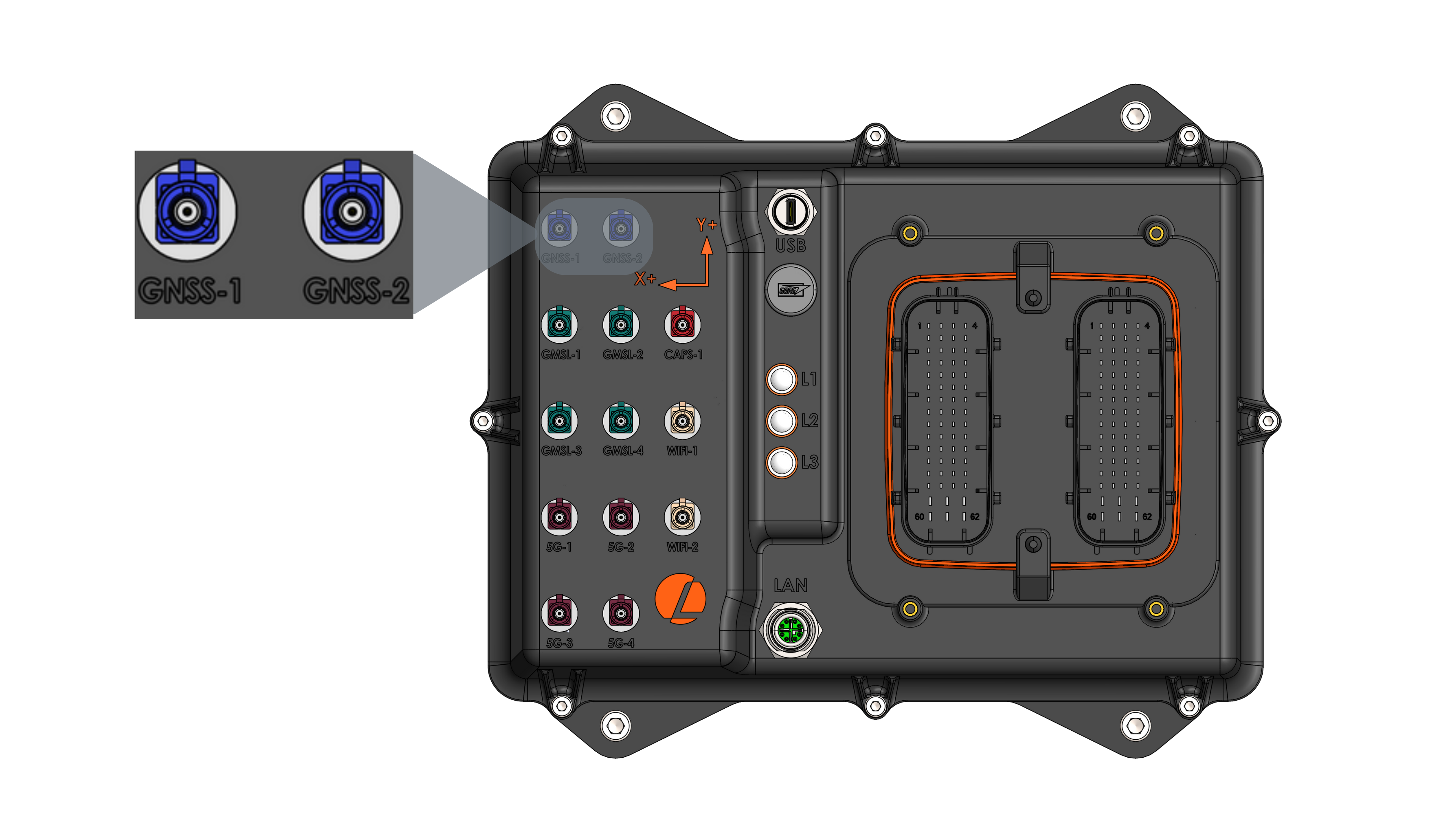
GNSS Position Specifications
| Parameter | Value |
|---|---|
| Receiver | u-blox F9P or F9R (see Wheel Speed & Direction Input) |
| Connector | GNSS-2 (FAKRA C - Signal Blue) |
| Supported Constellation | GPS, Galileo, BeiDou, GLONASS |
| Positional Accuracy | Down to 1 cm 1. Using u-blox PointPerfect correction <6 cm |
| Max Navigation Update Rate | Default 1 Hz (can be configured up to 7 Hz, or 5 Hz as the moving base for heading) |
1 Depends on antenna, distance to base station, or correction service. See the receiver datasheet for more information.
External Antenna
The AutomatePro system is compatible with a variety of multi-band high-precision GNSS antennas that have a FAKRA Type C connector (Signal Blue). More information on antennas used with AutomatePro is available here.
Wheel Speed & Direction Input
The AutomatePro provides options for both wheel speed and direction input for applications requiring dead reckoning.
Connection Details
| Pin Name & Number | Function | Description |
|---|---|---|
| WHEEL TIC / PIN 51 | Tachometer input | 5-24VDC input range (with respect to the common GND) |
| WHEEL DIR / PIN 52 | Wheel rotation direction input | 5-24VDC input range (with respect to the common GND) |
- Connector
- Development Breakout Board
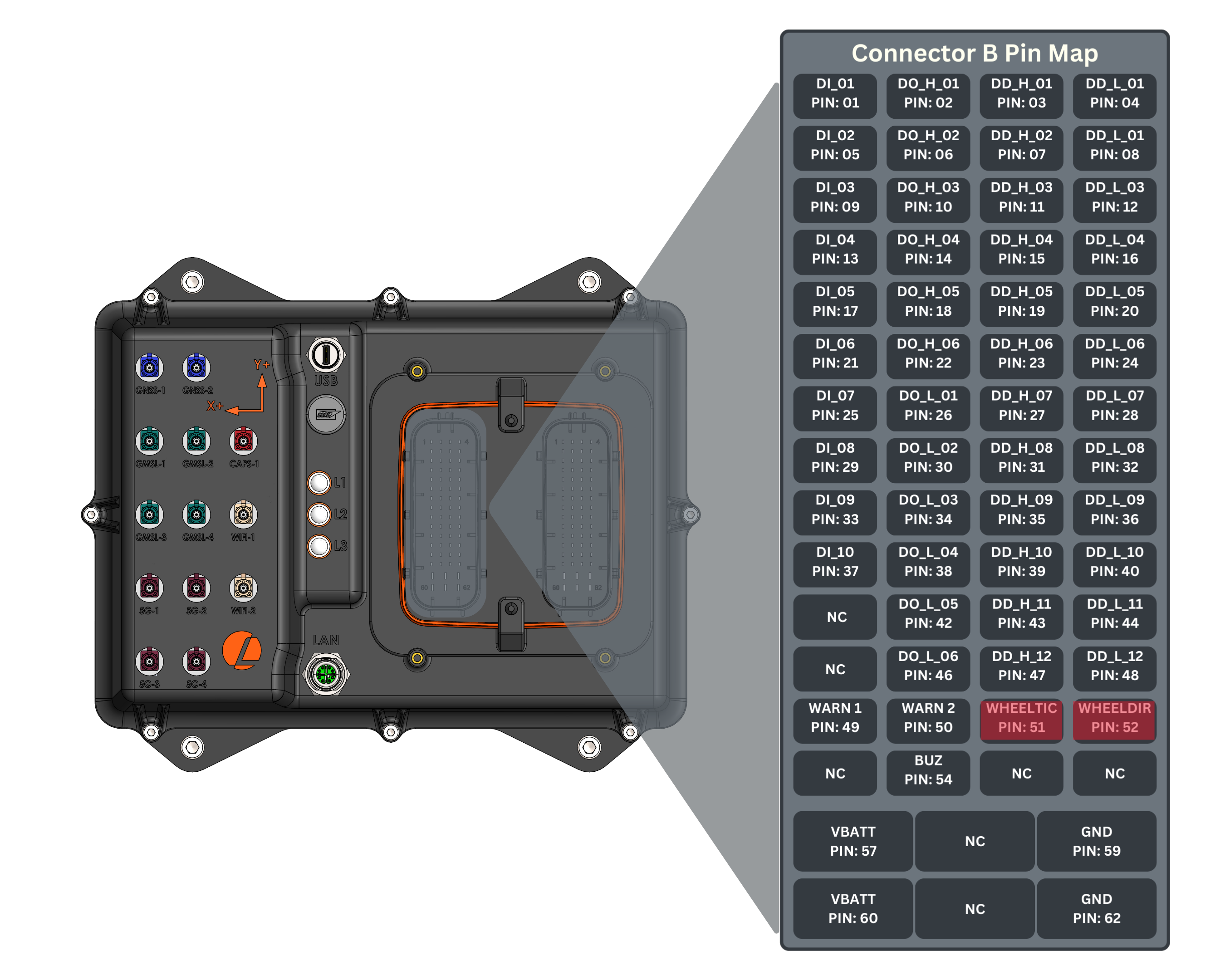
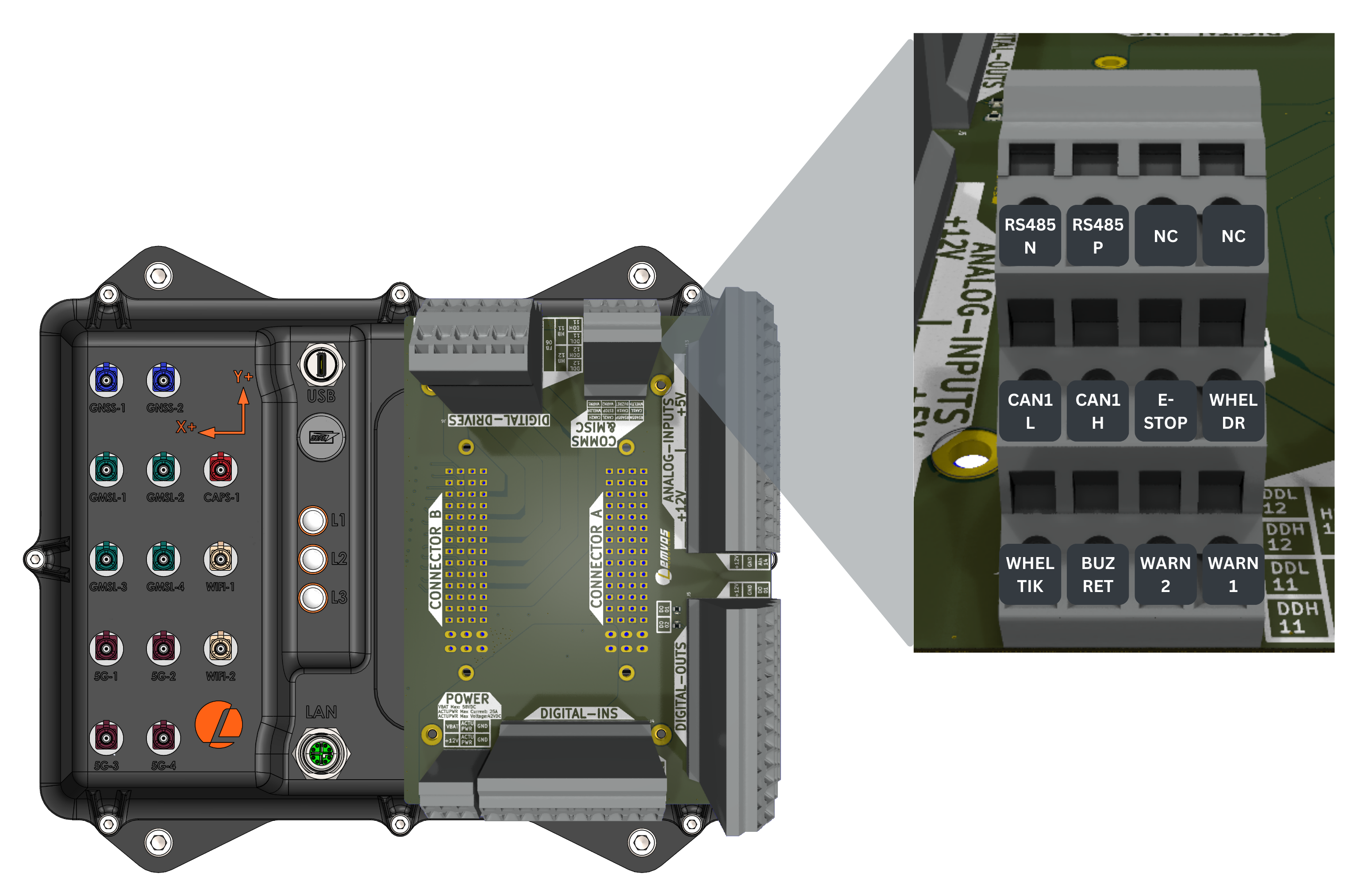
This is a non-standard option. Contact Lemvos for more information.
ROS API
Node: automatepro_gnss_position_node
Publishers
| Topic | Type | Description |
|---|---|---|
/sensor/gnss/position/fix | sensor_msgs/msg/NavSatFix | GNSS position data (navigation satellite fix). |
/sensor/gnss/position/fix_velocity | geometry_msgs/msg/TwistWithCovarianceStamped | Velocity in local ENU frame. |
/sensor/gnss/position/monhw | ublox_msgs/msg/MonHW | Hardware status of the GNSS position module. |
/sensor/gnss/position/monsys | ublox_msgs/msg/MonSYS | System monitor status of the GNSS position module. |
/sensor/gnss/position/nmea | nmea_msgs/msg/Sentence | Raw NMEA messages. |
/diagnostics | diagnostic_msgs/msg/DiagnosticArray | GNSS position ROS driver diagnostics. |
Subscribers
| Topic | Type | Description |
|---|---|---|
/sensor/gnss/correction | rtcm_msgs/msg/Message | RTCM or SPARTN Correction data |
Parameters
| Parameter | Type | Packaged default | Runtime R/W | Description |
|---|---|---|---|---|
device | string | /dev/serial/by-id/usb-u-blox_AG_-_www.u-blox.com_u-blox_GNSS_receiver_F9P-if00 | read | Serial port for the F9P receiver. |
frame_id | string | gnss_position | read | Frame ID for published messages. |
config_on_startup | bool | false | read | Leaves receiver flash configuration unchanged at startup. |
gpio.chipname | string | gpiochip0 | read | GPIO chip used for receiver reset recovery. |
gpio.line_num | int | 134 | read | GPIO line used for receiver reset recovery. |
gpio.reset_time_s | int | 1 | read | Reset pulse duration in seconds. |
recovery.cycle_time_s | int | 1 | read | Base interval between recovery attempts in seconds; it doubles after each failed attempt up to recovery.backoff_max_s. |
recovery.backoff_max_s | int | 60 | read | Longest interval between recovery attempts in seconds. |
recovery.gpio_pulse_limit | int | 3 | read | Consecutive pulses of the shared reset line before this node stops pulsing. A pulse resets both receivers. |
watchdog.timeout_ms | int | 3000 | read | Watchdog timeout in milliseconds. |
watchdog.cycle_time_ms | int | 500 | read | Watchdog check interval in milliseconds. |
publish.all | bool | false | read | Enables all publisher groups when true. |
publish.aid.hui | bool | false | read | Enables AID-HUI message publishing. |
publish.nav.posllh | bool | false | read | Enables NAV-POSLLH message publishing. |
publish.nav.posecef | bool | false | read | Enables NAV-POSECEF message publishing. |
publish.nav.relposned | bool | false | read | Keeps relative-position heading messages disabled for the position receiver. |
publish.nmea | bool | true | read | Enables NMEA sentence publishing. |
publish.mon.hw | bool | true | read | Enables UBX-MON-HW hardware status publishing. |
publish.mon.sys | bool | true | read | Enables UBX-MON-SYS system status publishing. |
debug | int | 0 | read | Debug verbosity; range 0-4. |
Configuration
Driver: automatepro_gnss_driver Container: automatepro-core-driver
Runtime configuration files are in the /opt/automatepro/config/ros directory.
Packaged defaults are installed in /opt/automatepro/defconfig/ros.
The runtime files are mounted into the Docker container and used by the ROS driver.
Environment variables can be set in the /opt/automatepro/.env file.
The runtime configuration file is:
/opt/automatepro/config/ros/gnss_position_params.yaml
The packaged default source is:
/opt/automatepro/defconfig/ros/gnss_position_params.yaml
ROS Configuration
# Configuration Settings for F9P device in Moving Base Mode
automatepro_gnss_position_node:
  ros__parameters:
    debug: 0                    # Range 0-4 (0 means no debug statements will print)

    device: /dev/serial/by-id/usb-u-blox_AG_-_www.u-blox.com_u-blox_GNSS_receiver_F9P-if00 #/dev/ttyACM1
    frame_id: gnss_position

    config_on_startup: false    # If false, the node will not override configurations of the device on startup
                                # Device should be configured with u-center and configurations should be saved in flash
                                # Please use the configuration file provided by Lemvos

    # GPIO configuration
    gpio:
      chipname: "gpiochip0"
      line_num: 134
      reset_time_s: 1

    # Recovery configuration
    recovery:
      cycle_time_s: 1
      backoff_max_s: 60
      gpio_pulse_limit: 3

    # Watchdog configuration
    watchdog:
      timeout_ms: 3000
      cycle_time_ms: 500

    # Enable u-blox gnss message publishers
    publish:
      all: false
      aid:
        hui: false
      nav:
        all: false
        posllh: false
        posecef: false
        relposned: false
      nmea: true
      mon:
        hw: true
        sys: true
Restart the automatepro-core-driver Docker container after changing the configuration.
Configuration changes are applied only after the container restarts.
sudo systemctl restart automatepro-core-driver
Device Configuration
This section describes the configuration of the GNSS device. To explore the capabilities of the GNSS device, refer to the u-blox documentation for more details.
Check the configuration section for more details.
Automatic Recovery
The driver watches the data stream from the receiver. It checks every watchdog.cycle_time_ms and starts recovery when no message has arrived for watchdog.timeout_ms.
Recovery runs in three steps, the least invasive first:
- Reopen the serial connection, leaving the receiver untouched.
- Reset the receiver in software with a UBX
CFG-RSThot start, which keeps the battery-backed data so re-acquisition is fast. - Pulse the reset line to power-cycle the receiver.
Each step ends by reopening the connection. The driver waits recovery.cycle_time_s between attempts and doubles the wait after each failed attempt, up to recovery.backoff_max_s.
The reset line is shared, so a pulse resets the position and the heading receiver together. Each node stops pulsing after recovery.gpio_pulse_limit consecutive pulses, counting the other node's pulses as well, and resumes only once data arrives again.
Example
This example prints the latitude, longitude, and altitude by subscribing to the /sensor/gnss/position/fix topic.
The tutorial package is available in the AutomatePro tutorials repository, and its README explains how to build and run the examples.
- Python
- C++
Source: gnss_position.py
import rclpy
from rclpy.executors import ExternalShutdownException
from rclpy.node import Node
from sensor_msgs.msg import NavSatFix


class GNSSPositionSubscriber(Node):

    def __init__(self):
        super().__init__('gnss_position_subscriber')
        self.subscription = self.create_subscription(
            NavSatFix,
            '/sensor/gnss/position/fix',
            self.listener_callback,
            10)

    def listener_callback(self, msg):
        self.get_logger().info('Latitude: %f' % msg.latitude)
        self.get_logger().info('Longitude: %f' % msg.longitude)
        self.get_logger().info('Altitude: %f' % msg.altitude)


def main(args=None):
    rclpy.init(args=args)
    node = GNSSPositionSubscriber()
    try:
        rclpy.spin(node)
    except (KeyboardInterrupt, ExternalShutdownException):
        pass
    finally:
        node.destroy_node()
        rclpy.try_shutdown()


if __name__ == '__main__':
    main()
Run the node using the following command:
ros2 run automatepro_python_tutorials gnss_position_node
Source: gnss_position.cpp
#include <rclcpp/rclcpp.hpp>
#include <sensor_msgs/msg/nav_sat_fix.hpp>

class GNSSPositionSubscriber : public rclcpp::Node
{
public:
  GNSSPositionSubscriber()
  : Node("gnss_position_subscriber")
  {
    subscription_ = this->create_subscription<sensor_msgs::msg::NavSatFix>(
      "/sensor/gnss/position/fix",
      10,
      std::bind(&GNSSPositionSubscriber::listener_callback, this, std::placeholders::_1));
  }

private:
  void listener_callback(const sensor_msgs::msg::NavSatFix::SharedPtr msg)
  {
    RCLCPP_INFO(this->get_logger(), "Latitude: %f", msg->latitude);
    RCLCPP_INFO(this->get_logger(), "Longitude: %f", msg->longitude);
    RCLCPP_INFO(this->get_logger(), "Altitude: %f", msg->altitude);
  }
  rclcpp::Subscription<sensor_msgs::msg::NavSatFix>::SharedPtr subscription_;
};

int main(int argc, char * argv[])
{
  rclcpp::init(argc, argv);
  auto node = std::make_shared<GNSSPositionSubscriber>();
  rclcpp::spin(node);
  rclcpp::shutdown();
  return 0;
}
Run the node using the following command:
ros2 run automatepro_cpp_tutorials gnss_position_node