RTK Heading
Hardware
AutomatePro can be configured with an integrated RTK GNSS heading sensor, providing precise heading. This is particularly useful when the onboard IMU’s magnetic bearing accuracy is insufficient or when the magnetometer is affected by the operational environment, such as around large steel structures. Depending on antenna placement, the GNSS heading sensor can also measure the robot’s roll or pitch.
The differential heading is provided by the u-blox F9H series. If included, AutomatePro will feature a blue FAKRA connector for antenna connection, with “GNSS-2” used for position and “GNSS-1” for heading.
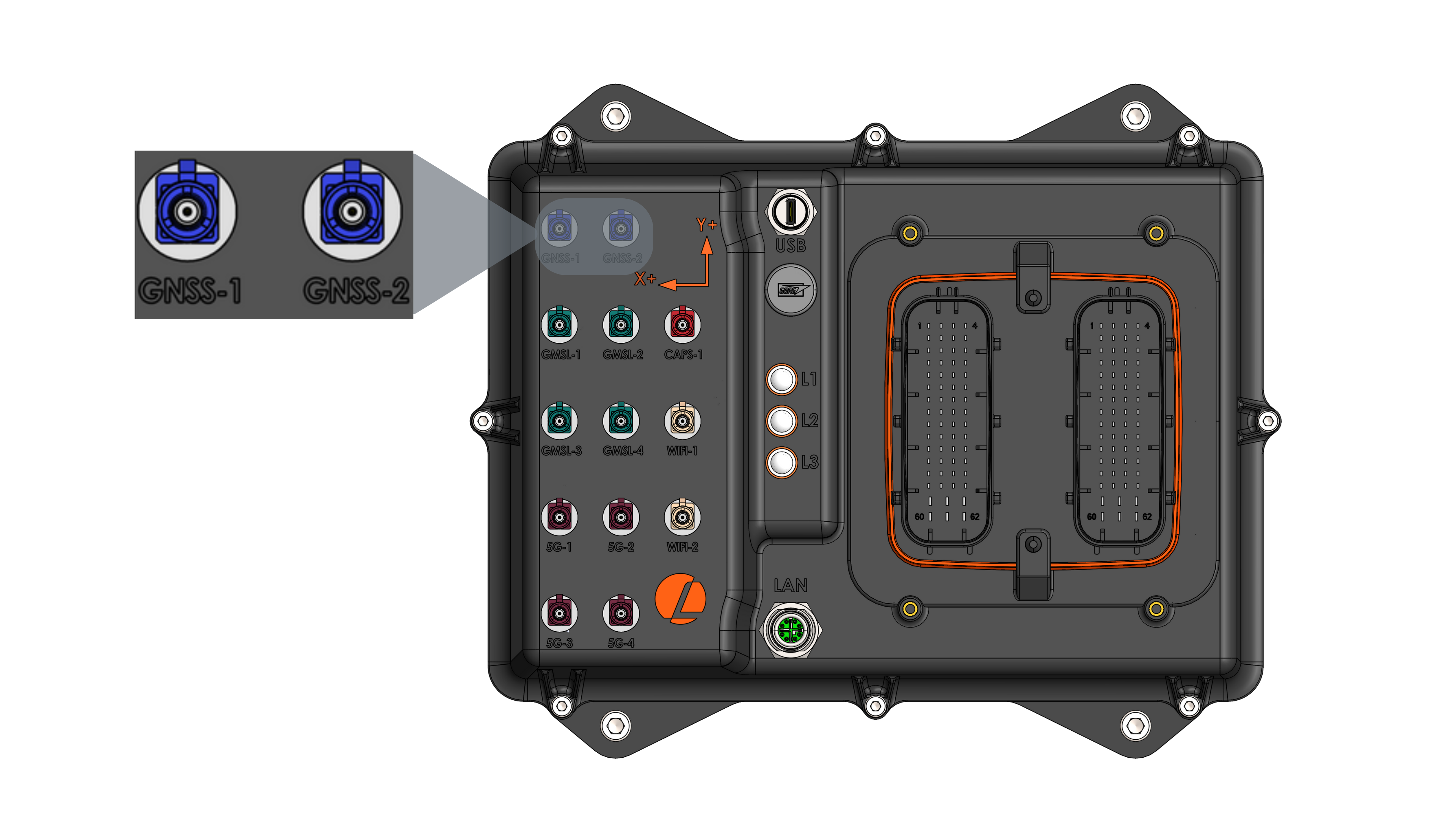
GNSS Heading Specifications
| Parameter | Value |
|---|---|
| Receiver | u-blox F9H |
| Connector | GNSS-1 (FAKRA C - Signal Blue) |
| Supported Constellation | GPS, Galileo, BeiDou, GLONASS |
| Heading Accuracy | 0.4° 1 (with antenna spacing >1m) |
| Max Navigation Update Rate | Default 1Hz (Can be configured up to 8Hz) |
1 Depends on antennas and spacing between the two antennas. See the datasheet for more information.
External Antenna
The AutomatePro system is compatible with a variety of multi-band high-precision GNSS antennas that have a FAKRA Type C connector (Signal Blue). More information on antennas used with AutomatePro is available here.
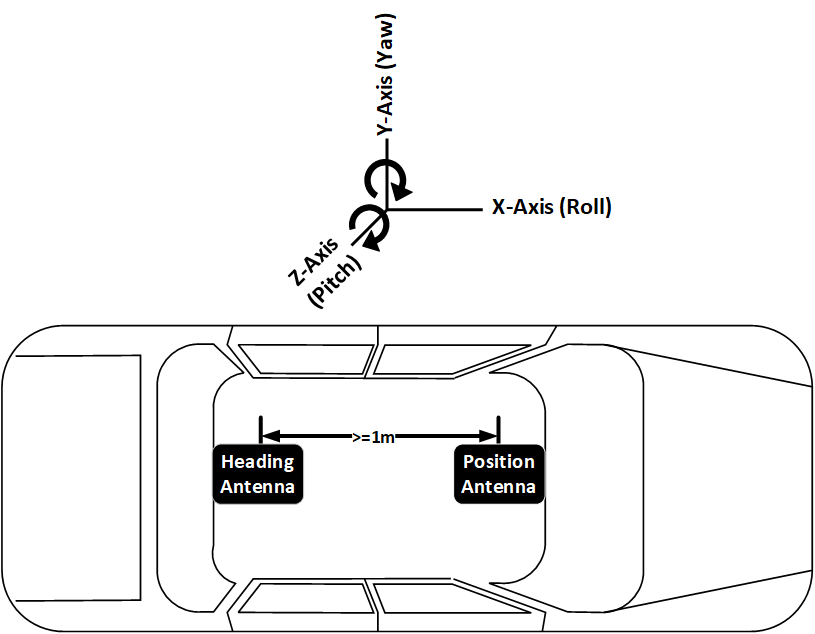
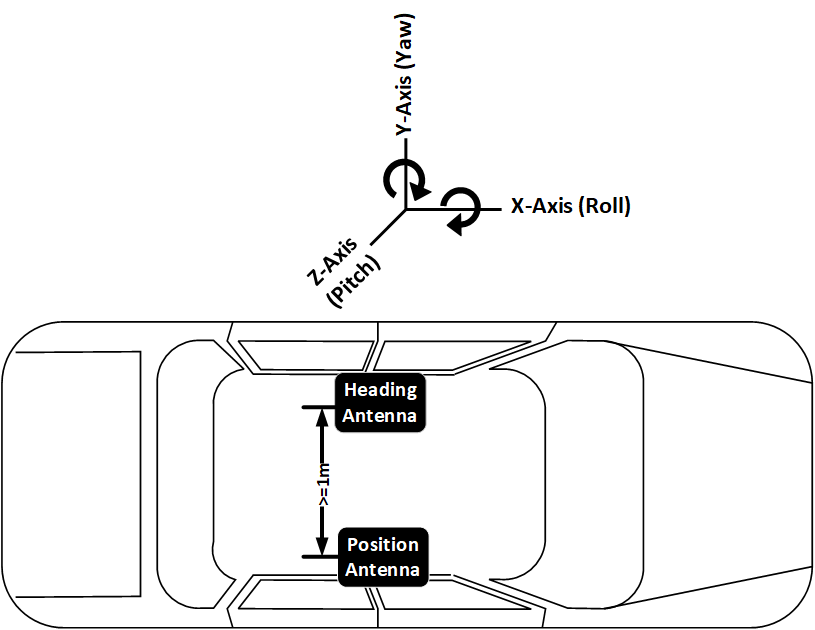
Antenna Separation: Ensure a minimum separation of 1 meter (≥1m) between the two GNSS antennas. Configuration options are heading (Yaw) and pitch or heading (Yaw) and roll.
ROS API
Node: automatepro_gnss_heading_node
Publishers
| Topic | Type | Description |
|---|---|---|
/sensor/gnss/heading/fix | sensor_msgs/msg/NavSatFix | GNSS fix from the heading receiver. |
/sensor/gnss/heading/fix_velocity | geometry_msgs/msg/TwistWithCovarianceStamped | Velocity from the heading receiver. |
/sensor/gnss/heading/true_heading | sensor_msgs/msg/Imu | Differential heading as an orientation quaternion with covariance. |
/sensor/gnss/heading/navrelposned | ublox_msgs/msg/NavRELPOSNED9 | Detailed differential heading with additional information for calculating either roll or pitch. |
/sensor/gnss/heading/monhw | ublox_msgs/msg/MonHW | Hardware status of the GNSS heading module. |
/sensor/gnss/heading/monsys | ublox_msgs/msg/MonSYS | System monitor status of the GNSS heading module. Published only when publish.mon.sys is true; the packaged configuration sets it to false because the F9H firmware rejects this message. |
/diagnostics | diagnostic_msgs/msg/DiagnosticArray | GNSS heading ROS driver diagnostics. |
Even though /sensor/gnss/heading/navrelposned provides more information, it is not required for normal use cases.
It is recommended to use /sensor/gnss/heading/true_heading for your application, which provides heading as a quaternion with covariance.
Parameters
| Parameter | Type | Packaged default | Runtime R/W | Description |
|---|---|---|---|---|
device | string | /dev/serial/by-id/usb-u-blox_AG_-_www.u-blox.com_u-blox_GNSS_receiver_F9H-if00 | read | Serial port for the F9H receiver. |
frame_id | string | gnss_heading | read | Frame ID for published messages. |
config_on_startup | bool | false | read | Leaves receiver flash configuration unchanged at startup. |
gpio.chipname | string | gpiochip0 | read | GPIO chip used for receiver reset recovery. |
gpio.line_num | int | 134 | read | GPIO line used for receiver reset recovery. |
gpio.reset_time_s | int | 1 | read | Reset pulse duration in seconds. |
recovery.cycle_time_s | int | 1 | read | Base interval between recovery attempts in seconds; it doubles after each failed attempt up to recovery.backoff_max_s. |
recovery.backoff_max_s | int | 60 | read | Longest interval between recovery attempts in seconds. |
recovery.gpio_pulse_limit | int | 3 | read | Consecutive pulses of the shared reset line before this node stops pulsing. A pulse resets both receivers. |
watchdog.timeout_ms | int | 3000 | read | Watchdog timeout in milliseconds. |
watchdog.cycle_time_ms | int | 500 | read | Watchdog check interval in milliseconds. |
publish.all | bool | false | read | Enables all publisher groups when true. |
publish.aid.hui | bool | false | read | Enables AID-HUI message publishing. |
publish.nav.relposned | bool | true | read | Enables NavRELPOSNED9 publishing. |
publish.nav.heading | bool | true | read | Enables heading publishing on /sensor/gnss/heading/true_heading. |
publish.nmea | bool | false | read | Keeps NMEA sentence publishing disabled for the heading receiver. |
publish.mon.hw | bool | true | read | Enables UBX-MON-HW hardware status publishing. |
publish.mon.sys | bool | false | read | Enables UBX-MON-SYS system status publishing. |
debug | int | 0 | read | Debug verbosity; range 0-4. |
Configuration
Driver: automatepro_gnss_driver Container: automatepro-core-driver
Runtime configuration files are in the /opt/automatepro/config/ros directory.
Packaged defaults are installed in /opt/automatepro/defconfig/ros.
The runtime files are mounted into the Docker container and used by the ROS driver.
Environment variables can be set in the /opt/automatepro/.env file.
The runtime configuration file is:
/opt/automatepro/config/ros/gnss_heading_params.yaml
The packaged default source is:
/opt/automatepro/defconfig/ros/gnss_heading_params.yaml
Default Config
# Configuration Settings for F9H device in Rover Mode
automatepro_gnss_heading_node:
  ros__parameters:
    debug: 0                    # Range 0-4 (0 means no debug statements will print)

    device: /dev/serial/by-id/usb-u-blox_AG_-_www.u-blox.com_u-blox_GNSS_receiver_F9H-if00 #/dev/ttyACM0
    frame_id: gnss_heading

    config_on_startup: false    # If false, the node will not override configurations of the device on startup
                                # Device should be configured with u-center and configurations should be saved in flash
                                # Please use the configuration file provided by Lemvos

    # GPIO configuration
    gpio:
      chipname: "gpiochip0"
      line_num: 134
      reset_time_s: 1

    # Recovery configuration
    recovery:
      cycle_time_s: 1
      backoff_max_s: 60
      gpio_pulse_limit: 3

    # Watchdog configuration
    watchdog:
      timeout_ms: 3000
      cycle_time_ms: 500

    # Enable u-blox gnss message publishers
    publish:
      all: false
      aid:
        hui: false
      nav:
        relposned: true
        heading: true
      nmea: false
      mon:
        hw: true
        sys: false
Restart the automatepro-core-driver Docker container after changing the configuration.
Configuration changes are applied only after the container restarts.
sudo systemctl restart automatepro-core-driver
Automatic Recovery
The driver watches the data stream from the receiver. It checks every watchdog.cycle_time_ms and starts recovery when no message has arrived for watchdog.timeout_ms.
Recovery runs in three steps, the least invasive first:
- Reopen the serial connection, leaving the receiver untouched.
- Reset the receiver in software with a UBX
CFG-RSThot start, which keeps the battery-backed data so re-acquisition is fast. - Pulse the reset line to power-cycle the receiver.
Each step ends by reopening the connection. The driver waits recovery.cycle_time_s between attempts and doubles the wait after each failed attempt, up to recovery.backoff_max_s.
The reset line is shared, so a pulse resets the position and the heading receiver together. Each node stops pulsing after recovery.gpio_pulse_limit consecutive pulses, counting the other node's pulses as well, and resumes only once data arrives again.
Example
This example prints the heading, clockwise from north, and its accuracy by subscribing to the /sensor/gnss/heading/true_heading topic.
The tutorial package is available in the AutomatePro tutorials repository, and its README explains how to build and run the examples.
- Python
- C++
Source: gnss_heading.py
import math

import rclpy
from rclpy.executors import ExternalShutdownException
from rclpy.node import Node
from sensor_msgs.msg import Imu

INVALID_HEADING_COVARIANCE = 1000.0


class GNSSHeadingSubscriber(Node):

    def __init__(self):
        super().__init__('gnss_heading_subscriber')
        self.subscription = self.create_subscription(
            Imu,
            '/sensor/gnss/heading/true_heading',
            self.listener_callback,
            10)

    def listener_callback(self, msg):
        yaw_variance = msg.orientation_covariance[8]
        if yaw_variance >= INVALID_HEADING_COVARIANCE:
            self.get_logger().info('Heading not valid')
            return
        q = msg.orientation
        # Yaw in the ROS ENU convention: counterclockwise from east.
        yaw = math.atan2(2.0 * (q.w * q.z + q.x * q.y), 1.0 - 2.0 * (q.y * q.y + q.z * q.z))
        # Compass heading: clockwise from north, 0 to 360 degrees.
        heading_deg = (90.0 - math.degrees(yaw)) % 360.0
        self.get_logger().info('Heading: %.2f deg, accuracy: %.2f deg' % (
            heading_deg, math.degrees(math.sqrt(yaw_variance))))


def main(args=None):
    rclpy.init(args=args)
    node = GNSSHeadingSubscriber()
    try:
        rclpy.spin(node)
    except (KeyboardInterrupt, ExternalShutdownException):
        pass
    finally:
        node.destroy_node()
        rclpy.try_shutdown()


if __name__ == '__main__':
    main()
Run the node using the following command:
ros2 run automatepro_python_tutorials gnss_heading_node
Source: gnss_heading.cpp
#include <cmath>
#include <functional>
#include <memory>

#include <rclcpp/rclcpp.hpp>
#include <sensor_msgs/msg/imu.hpp>

class GNSSHeadingSubscriber : public rclcpp::Node
{
public:
  GNSSHeadingSubscriber()
  : Node("gnss_heading_subscriber")
  {
    subscription_ = this->create_subscription<sensor_msgs::msg::Imu>(
      "/sensor/gnss/heading/true_heading",
      10,
      std::bind(&GNSSHeadingSubscriber::listener_callback, this, std::placeholders::_1));
  }

private:
  static constexpr double kInvalidHeadingCovariance = 1000.0;
  static constexpr double kRadToDeg = 180.0 / M_PI;

  void listener_callback(const sensor_msgs::msg::Imu::SharedPtr msg) const
  {
    const double yaw_variance = msg->orientation_covariance[8];
    if (yaw_variance >= kInvalidHeadingCovariance) {
      RCLCPP_INFO(this->get_logger(), "Heading not valid");
      return;
    }
    const auto & q = msg->orientation;
    // Yaw in the ROS ENU convention: counterclockwise from east.
    const double yaw = std::atan2(
      2.0 * (q.w * q.z + q.x * q.y),
      1.0 - 2.0 * (q.y * q.y + q.z * q.z));
    // Compass heading: clockwise from north, 0 to 360 degrees.
    double heading_deg = std::fmod(90.0 - yaw * kRadToDeg, 360.0);
    if (heading_deg < 0.0) {
      heading_deg += 360.0;
    }
    RCLCPP_INFO(
      this->get_logger(), "Heading: %.2f deg, accuracy: %.2f deg",
      heading_deg, std::sqrt(yaw_variance) * kRadToDeg);
  }

  rclcpp::Subscription<sensor_msgs::msg::Imu>::SharedPtr subscription_;
};

int main(int argc, char * argv[])
{
  rclcpp::init(argc, argv);
  auto node = std::make_shared<GNSSHeadingSubscriber>();
  rclcpp::spin(node);
  rclcpp::shutdown();
  return 0;
}
Run the node using the following command:
ros2 run automatepro_cpp_tutorials gnss_heading_node