IMU
Hardware
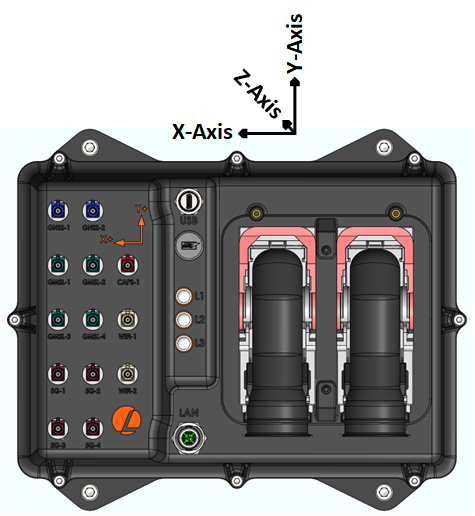
AutomatePro features an advanced onboard 9-axis MEMS Inertial Measurement Unit (IMU). This IMU integrates a triaxial
accelerometer, a triaxial gyroscope, and a magnetometer. This is output as a ROS IMU topic. The arrows on the device indicated the direction of the IMU vectors see the image below
IMU Specifications
| Parameter | Value |
|---|---|
| Sensor | BNO085 |
| Sensing Types | 3 axis Gyroscope, 3 axis Magnetometer, 3 axis Accelerometer |
| Rotation Vector Error (Dynamic)1 | 3.5° |
| Accelerometer Accuracy1 | 0.3m/s2 |
| Gyroscope Accuracy1 | 3.1°/s |
| Magnetometer Accuracy1 | 1.4uT |
| IMU Sensor Sample Rate | Default 100Hz (configurable upto 200Hz) |
1 based on IC manufacture tests so results might be slightly different for AMP - see datasheet for more information
IMU
ROS API
Node: automatepro_imu_driver
Publishers
| Topic | Type | Description |
|---|---|---|
/sensor/imu/data | sensor_msgs/msg/Imu | Contains orientation, angular velocity and linear acceleration. |
/sensor/imu/magnetic_field | sensor_msgs/msg/MagneticField | Contains magnetic field data. |
Parameters
| Parameter | Type | Values | Runtime R/W | Description |
|---|---|---|---|---|
frame_id | string | imu | read-only | The frame sensor data messages. |
publish.imu.enabled | bool | true / false | read-only | Enable publishing of IMU messages. |
publish.imu.rate | int | 1-200 | read-only | The data rate for the IMU in Hz. |
publish.magnetic_field.enabled | bool | true / false | read-only | Magnetometer is enabled if true. |
publish.magnetic_field.rate | int | 1-100 | read-only | The data rate for the magnetometer in Hz. |
Configuration
Driver: automatepro_imu_driver
Container: automatepro-core-driver
All the configuration related files can be found at ~/.automatepro/config/ros directory.
These files will be mounted to docker container and will be used by the ROS driver.
config file can be found here.
~/.automatepro/config/ros/imu_params.yaml
Default Config
automatepro_imu_driver:
  ros__parameters:
    frame_id: "imu"
    i2c:
      enabled: true
      bus: "/dev/i2c-7"
      address: "0x4B"
    publish:
      magnetic_field:
        enabled: true
        rate: 100   # max 100 Hz
      imu:
        enabled: true
        rate: 100   # max 200 Hz
Restart the automatepro-core-driver docker container after changing the configuration.
Configurations will only be applied after the container restarts.
docker restart automatepro-core-driver
Example
Example code snippet prints the IMU data and MagneticField data by subscribing to the /sensor/imu/data and /sensor/imu/magnetic_field topics.
- Python
- C++
import rclpy
from rclpy.node import Node
from sensor_msgs.msg import Imu, MagneticField

class ImuSubscriber(Node):

    def __init__(self):
        super().__init__('imu_subscriber')
        self.imu_subscription = self.create_subscription(
            Imu,
            '/sensor/imu/data',
            self.imu_callback,
            10)
        self.magnetic_field_subscription = self.create_subscription(
            MagneticField,
            '/sensor/imu/magnetic_field',
            self.magnetic_field_callback,
            10)

    def imu_callback(self, msg):
        self.get_logger().info('Received IMU message: orientation=%s, angular_velocity=%s, linear_acceleration=%s' % (
          msg.orientation, msg.angular_velocity, msg.linear_acceleration))

    def magnetic_field_callback(self, msg):
        self.get_logger().info('Received MagneticField message: magnetic_field=%s' % msg.magnetic_field)

def main(args=None):
    rclpy.init(args=args)
    node = ImuSubscriber()
    rclpy.spin(node)
    node.destroy_node()
    rclpy.shutdown()

if __name__ == '__main__':
    main()
Run the node using the following command:
ros2 run automatepro_py_tutorials imu_node
#include <rclcpp/rclcpp.hpp>
#include <sensor_msgs/msg/imu.hpp>
#include <sensor_msgs/msg/magnetic_field.hpp>

class ImuSubscriber : public rclcpp::Node
{
public:
  ImuSubscriber()
      : Node("imu_subscriber")
  {
      imu_subscription_ = this->create_subscription<sensor_msgs::msg::Imu>(
          "/sensor/imu/data", 10, std::bind(&ImuSubscriber::imu_callback, this, std::placeholders::_1));

      magnetic_field_subscription_ = this->create_subscription<sensor_msgs::msg::MagneticField>(
          "/sensor/imu/magnetic_field", 10, std::bind(&ImuSubscriber::magnetic_field_callback, this, std::placeholders::_1));
  }

private:
  void imu_callback(const sensor_msgs::msg::Imu::SharedPtr msg) const
  {
      RCLCPP_INFO(this->get_logger(),
                  "Received IMU message: orientation=[x: %f, y: %f, z: %f, w: %f], angular_velocity=[x: %f, y: %f, z: %f], linear_acceleration=[x: %f, y: %f, z: %f]",
                  msg->orientation.x, msg->orientation.y, msg->orientation.z, msg->orientation.w,
                  msg->angular_velocity.x, msg->angular_velocity.y, msg->angular_velocity.z,
                  msg->linear_acceleration.x, msg->linear_acceleration.y, msg->linear_acceleration.z);
  }

  void magnetic_field_callback(const sensor_msgs::msg::MagneticField::SharedPtr msg) const
  {
      RCLCPP_INFO(this->get_logger(),
                  "Received MagneticField message: magnetic_field=[x: %f, y: %f, z: %f]",
                  msg->magnetic_field.x, msg->magnetic_field.y, msg->magnetic_field.z);
  }

  rclcpp::Subscription<sensor_msgs::msg::Imu>::SharedPtr imu_subscription_;
  rclcpp::Subscription<sensor_msgs::msg::MagneticField>::SharedPtr magnetic_field_subscription_;
};

int main(int argc, char *argv[])
{
  rclcpp::init(argc, argv);
  rclcpp::spin(std::make_shared<ImuSubscriber>());
  rclcpp::shutdown();
  return 0;
}
Run the node using the following command:
ros2 run automatepro_cpp_tutorials imu_node