IMU
Hardware
AutomatePro includes an onboard BNO085 9-axis MEMS IMU. The IMU combines a 3-axis accelerometer, 3-axis gyroscope, and 3-axis magnetometer. The driver publishes ROS 2 IMU data and, when enabled, magnetic-field and accuracy data.
The arrows on the device indicate the IMU vector directions:
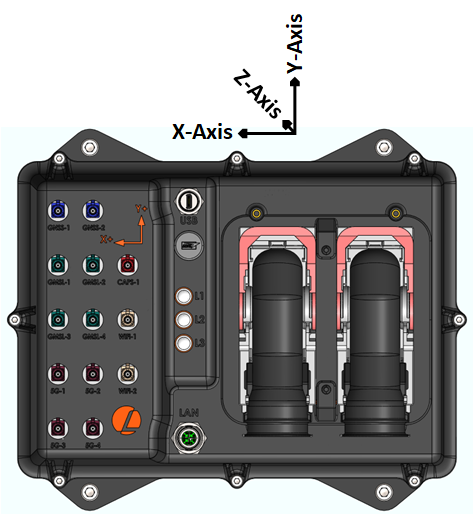
IMU Specifications
| Parameter | Value |
|---|---|
| Sensor | BNO085 |
| Sensing types | 3-axis gyroscope, 3-axis magnetometer, 3-axis accelerometer |
| Rotation vector error (dynamic)1 | 3.5 deg |
| Accelerometer accuracy1 | 0.3 m/s2 |
| Gyroscope accuracy1 | 3.1 deg/s |
| Magnetometer accuracy1 | 1.4 uT |
| Default IMU sample rate | 100 Hz |
| Configurable IMU rate | Up to 400 Hz, hardware dependent |
1 Based on IC manufacturer tests. Results on AutomatePro can vary by mounting, calibration, and magnetic environment. See the BNO080/BNO085 datasheet for manufacturer details.
ROS API
Node: automatepro_imu_driver
Publishers
| Topic | Type | Description |
|---|---|---|
/sensor/imu/data | sensor_msgs/msg/Imu | Orientation, angular velocity, and linear acceleration. |
/sensor/imu/magnetic_field | sensor_msgs/msg/MagneticField | Magnetic field data, when magnetometer publishing is enabled. |
/sensor/imu/accuracy | automatepro_imu_driver/msg/ImuAccuracy | Accuracy levels for orientation, accelerometer, gyroscope, and magnetic-field reports. |
Services
| Service | Type | Description |
|---|---|---|
/sensor/imu/save_tare | std_srvs/srv/Trigger | Persists the current tare to sensor flash. |
/sensor/imu/save_calibration | std_srvs/srv/Trigger | Saves Dynamic Calibration Data (DCD) to sensor flash. |
/sensor/imu/reinit | std_srvs/srv/Trigger | Reinitializes the IMU driver and sensor. |
Verify IMU Data
Run these checks from AutomatePro over SSH:
source /opt/ros/humble/setup.bash
ros2 node list | grep automatepro_imu_driver
ros2 topic echo /sensor/imu/data --once --qos-reliability best_effort
If accuracy publishing is enabled, check calibration state:
ros2 topic echo /sensor/imu/accuracy --once
Accuracy levels use:
| Value | Meaning |
|---|---|
0 | Unreliable |
1 | Low |
2 | Medium |
3 | High |
255 | Unknown |
Configuration
Driver: automatepro_imu_driver
Container: automatepro-core-driver
Runtime ROS configuration is stored in /opt/automatepro/config/ros. Packaged defaults are stored in /opt/automatepro/defconfig/ros.
Edit the IMU parameter file:
sudo nano /opt/automatepro/config/ros/imu_params.yaml
Important parameters:
| Parameter | Default | Description |
|---|---|---|
log_level | info | Driver log level. Launch accepts debug, info, warn, error, or fatal. |
frame_id | lm450_imu_link | Frame ID stamped on published IMU messages. |
rotation_vector_mode | game_rotation_vector | Orientation report type. Use rotation_vector for magnetic absolute heading, game_rotation_vector for relative heading without magnetometer, or geomagnetic_rotation_vector for geomagnetic heading. |
tare.on_startup | false | Applies one-shot tare when the node starts. Leave disabled after commissioning. |
tare.axes | xyz | Axes included in tare. |
tare.persist | false | Saves tare to flash when enabled. |
tare.use_persisted | false | Composes the tare saved in the sensor with the mounting orientation. When false, the driver ignores the saved tare and uses the mounting orientation as the absolute reorientation. |
tare.orientation.enabled | true | Applies the configured chip-to-body orientation mapping at startup and watchdog reinitialization. |
tare.orientation.roll_deg/pitch_deg/yaw_deg | 0.0/0.0/0.0 | Mounting orientation in degrees when use_quaternion is false. |
tare.orientation.use_quaternion | false | Uses qx, qy, qz, and qw instead of roll, pitch, and yaw when enabled. |
tare.orientation.qx/qy/qz/qw | 0/0/0/1 | Quaternion orientation mapping when use_quaternion is true. |
calibration.accelerometer.enabled | false | Enables BNO08x accelerometer dynamic calibration. |
calibration.accelerometer.planar | false | Enables planar accelerometer calibration mode. |
calibration.gyroscope.enabled | false | Enables BNO08x gyroscope dynamic calibration. |
calibration.gyroscope.on_table | false | Enables stationary on-table gyroscope calibration assist. |
calibration.magnetic_field.enabled | false | Enables BNO08x magnetometer dynamic calibration. Enable only when magnetic heading is required and the environment is suitable. |
calibration.save_dcd | false | Periodically saves Dynamic Calibration Data to flash. |
i2c.enabled | true | Uses I2C communication. |
i2c.bus | /dev/i2c-7 | I2C bus path. |
i2c.address | 0x4B | BNO08x I2C address. |
uart.enabled | false | Uses UART communication instead of I2C when enabled and i2c.enabled is false. |
uart.device | /dev/ttyACM0 | UART device path when UART transport is enabled. |
publish.accuracy.enabled | true | Publishes /sensor/imu/accuracy. |
publish.imu.enabled | true | Publishes /sensor/imu/data. |
publish.imu.rate | 100 | Requested IMU report rate in Hz. |
publish.magnetic_field.enabled | false | Publishes /sensor/imu/magnetic_field. Use --qos-reliability best_effort when echoing this topic from the CLI. |
publish.magnetic_field.rate | 100 | Requested magnetometer report rate in Hz. |
publish.imu.orientation_offset.enabled | false | Applies a software quaternion offset before publishing orientation. |
publish.imu.orientation_offset.qx/qy/qz/qw | 0/0/0/1 | Software orientation offset quaternion. |
Restart automatepro-core-driver after changing the configuration. Configuration values are loaded when the driver container starts and are only applied after the service restarts.
sudo systemctl restart automatepro-core-driver
Default Configuration Shape
automatepro_imu_driver:
  ros__parameters:
    log_level: "info"
    frame_id: "lm450_imu_link"
    rotation_vector_mode: "game_rotation_vector"
    tare:
      on_startup: false
      axes: "xyz"
      persist: false
      use_persisted: false
      orientation:
        enabled: true
        roll_deg: 0.0
        pitch_deg: 0.0
        yaw_deg: 0.0
        use_quaternion: false
        qx: 0.0
        qy: 0.0
        qz: 0.0
        qw: 1.0
    calibration:
      accelerometer:
        enabled: false
        planar: false
      gyroscope:
        enabled: false
        on_table: false
      magnetic_field:
        enabled: false
      save_dcd: false
    i2c:
      enabled: true
      bus: "/dev/i2c-7"
      address: "0x4B"
    uart:
      enabled: false
      device: "/dev/ttyACM0"
    publish:
      accuracy:
        enabled: true
      magnetic_field:
        enabled: false
        rate: 100
      imu:
        enabled: true
        rate: 100
        orientation_offset:
          enabled: false
          qx: 0.0
          qy: 0.0
          qz: 0.0
          qw: 1.0
Example
This example prints IMU and magnetic field messages, each at most once per second, by subscribing to /sensor/imu/data and /sensor/imu/magnetic_field; the driver publishes the magnetic field only when publish.magnetic_field.enabled is true.
The tutorial package is available in the AutomatePro tutorials repository, and its README explains how to build and run the examples.
- Python
- C++
Source: imu.py
import rclpy
from rclpy.executors import ExternalShutdownException
from rclpy.node import Node
from sensor_msgs.msg import Imu, MagneticField

LOG_PERIOD_S = 1.0


class ImuSubscriber(Node):

    def __init__(self):
        super().__init__('imu_subscriber')
        self.imu_subscription = self.create_subscription(
            Imu,
            '/sensor/imu/data',
            self.imu_callback,
            10)
        self.magnetic_field_subscription = self.create_subscription(
            MagneticField,
            '/sensor/imu/magnetic_field',
            self.magnetic_field_callback,
            10)

    def imu_callback(self, msg):
        self.get_logger().info(
            'Received IMU message: orientation=%s, angular_velocity=%s, '
            'linear_acceleration=%s' % (
                msg.orientation, msg.angular_velocity, msg.linear_acceleration),
            throttle_duration_sec=LOG_PERIOD_S)

    def magnetic_field_callback(self, msg):
        self.get_logger().info(
            'Received MagneticField message: magnetic_field=%s' % msg.magnetic_field,
            throttle_duration_sec=LOG_PERIOD_S)


def main(args=None):
    rclpy.init(args=args)
    node = ImuSubscriber()
    try:
        rclpy.spin(node)
    except (KeyboardInterrupt, ExternalShutdownException):
        pass
    finally:
        node.destroy_node()
        rclpy.try_shutdown()


if __name__ == '__main__':
    main()
Run the node using the following command:
ros2 run automatepro_python_tutorials imu_node
Source: imu.cpp
#include <rclcpp/rclcpp.hpp>
#include <sensor_msgs/msg/imu.hpp>
#include <sensor_msgs/msg/magnetic_field.hpp>

class ImuSubscriber : public rclcpp::Node
{
public:
  ImuSubscriber()
  : Node("imu_subscriber")
  {
    imu_subscription_ = this->create_subscription<sensor_msgs::msg::Imu>(
      "/sensor/imu/data", 10, std::bind(&ImuSubscriber::imu_callback, this, std::placeholders::_1));

    magnetic_field_subscription_ = this->create_subscription<sensor_msgs::msg::MagneticField>(
      "/sensor/imu/magnetic_field", 10,
      std::bind(&ImuSubscriber::magnetic_field_callback, this, std::placeholders::_1));
  }

private:
  static constexpr int kLogPeriodMs = 1000;

  void imu_callback(const sensor_msgs::msg::Imu::SharedPtr msg)
  {
    RCLCPP_INFO_THROTTLE(
      this->get_logger(),
      *this->get_clock(), kLogPeriodMs,
      "Received IMU message: orientation=[x: %f, y: %f, z: %f, w: %f], "
      "angular_velocity=[x: %f, y: %f, z: %f], linear_acceleration=[x: %f, y: %f, z: %f]",
      msg->orientation.x, msg->orientation.y, msg->orientation.z, msg->orientation.w,
      msg->angular_velocity.x, msg->angular_velocity.y, msg->angular_velocity.z,
      msg->linear_acceleration.x, msg->linear_acceleration.y, msg->linear_acceleration.z);
  }

  void magnetic_field_callback(const sensor_msgs::msg::MagneticField::SharedPtr msg)
  {
    RCLCPP_INFO_THROTTLE(
      this->get_logger(), *this->get_clock(), kLogPeriodMs,
      "Received MagneticField message: magnetic_field=[x: %.3e, y: %.3e, z: %.3e]",
      msg->magnetic_field.x, msg->magnetic_field.y, msg->magnetic_field.z);
  }

  rclcpp::Subscription<sensor_msgs::msg::Imu>::SharedPtr imu_subscription_;
  rclcpp::Subscription<sensor_msgs::msg::MagneticField>::SharedPtr magnetic_field_subscription_;
};

int main(int argc, char * argv[])
{
  rclcpp::init(argc, argv);
  rclcpp::spin(std::make_shared<ImuSubscriber>());
  rclcpp::shutdown();
  return 0;
}
Run the node using the following command:
ros2 run automatepro_cpp_tutorials imu_node
Orientation Commissioning
Use this workflow when the IMU is remounted, when the reference orientation changes, or when a system needs a known rest pose.
Perform tare and calibration only when the device is in its final mounting position and away from motors, steel structures, strong magnets, and current-carrying wires.
-
Complete dynamic calibration.
Dynamic calibration is off in the packaged configuration, because slow yaw turns during operation mis-calibrate the gyroscope. For a calibration session, set
calibration.accelerometer.enabledandcalibration.gyroscope.enabledtotrue, andcalibration.magnetic_field.enabledonly if magnetic heading is required, then restart the core driver.Move the device through several stable orientations for accelerometer calibration, leave it stationary for gyroscope calibration, and perform magnetic rotations only if magnetic-field calibration is enabled. Save the calibration:
ros2 service call /sensor/imu/save_calibration std_srvs/srv/TriggerSet the calibration flags back to
falseand restart the core driver. -
Tare the reference pose (optional).
With the packaged
tare.use_persisted: false, the driver ignores a tare saved in the sensor and uses the mounting orientation from step 3 as the absolute reorientation, so a tare does not survive a restart. A saved tare does not apply togame_rotation_vector, the default mode; use steps 3 and 4 instead.To use a saved tare with
rotation_vector, place AutomatePro in the desired zero orientation and temporarily set:tare:on_startup: trueaxes: "xyz"persist: trueuse_persisted: trueRestart the core driver and wait for tare completion in logs:
sudo systemctl restart automatepro-core-driversudo journalctl -u automatepro-core-driver -fAfter tare completes, set
tare.on_startup: falseso it is not applied on every boot. Keeptare.use_persisted: true. -
Set mounting orientation.
Use
tare.orientation.roll_deg,pitch_deg, andyaw_degto map the chip axes to the device body frame. This orientation mapping is re-applied on startup and watchdog recovery. -
Apply software heading offset when needed.
If the device in the rest pose should publish identity orientation
(0, 0, 0, 1), capture the current quaternion:ros2 topic echo /sensor/imu/data --field orientation --onceSet
publish.imu.orientation_offset.*to the conjugate of that quaternion and enablepublish.imu.orientation_offset.enabled. -
Verify the final output.
Restart the core driver and verify that the rest pose and motion directions match your robot frame:
sudo systemctl restart automatepro-core-driverros2 topic echo /sensor/imu/data --field orientation --once
Developer Notes: rotation modes and persistence
rotation_vector_mode selects which BNO08x SH-2 report is enabled. game_rotation_vector does not use the magnetometer and reports relative heading. rotation_vector and geomagnetic_rotation_vector use magnetic information for heading.
Dynamic tare runs only on initial node startup when tare.on_startup is enabled. The fixed mounting orientation is re-applied on every sensor initialization, including watchdog recovery. The software orientation offset is applied as q_published = q_offset * q_sensor.
Troubleshooting
IMU Topic Is Missing
Check that the driver is enabled:
grep ROS_DRIVER_IMU /opt/automatepro/.env
Check logs:
sudo journalctl -u automatepro-core-driver -n 100 --no-pager
Automatic Recovery
The driver watches the sensor data stream and reinitializes the sensor when no data arrives for two seconds. This is the same action as the /sensor/imu/reinit service, and the period and timeout are fixed in the driver.
The mounting orientation configured under tare.orientation is applied again on every reinitialization. A dynamic tare is not, as described in Orientation Commissioning.
Orientation Is Correct After Startup but Wrong After Recovery
Verify tare.orientation.enabled: true. The fixed orientation mapping is the part reapplied on every sensor initialization.
Heading Drifts or Jumps
Check the rotation-vector mode and magnetic environment. If the system does not require magnetic absolute heading, game_rotation_vector is less sensitive to magnetic disturbances. If magnetic heading is required, calibrate in the deployment environment and monitor /sensor/imu/accuracy.