Dev Breakout Board Mounting Instructions
This procedure covers the Development Breakout Board (AMP-1004).
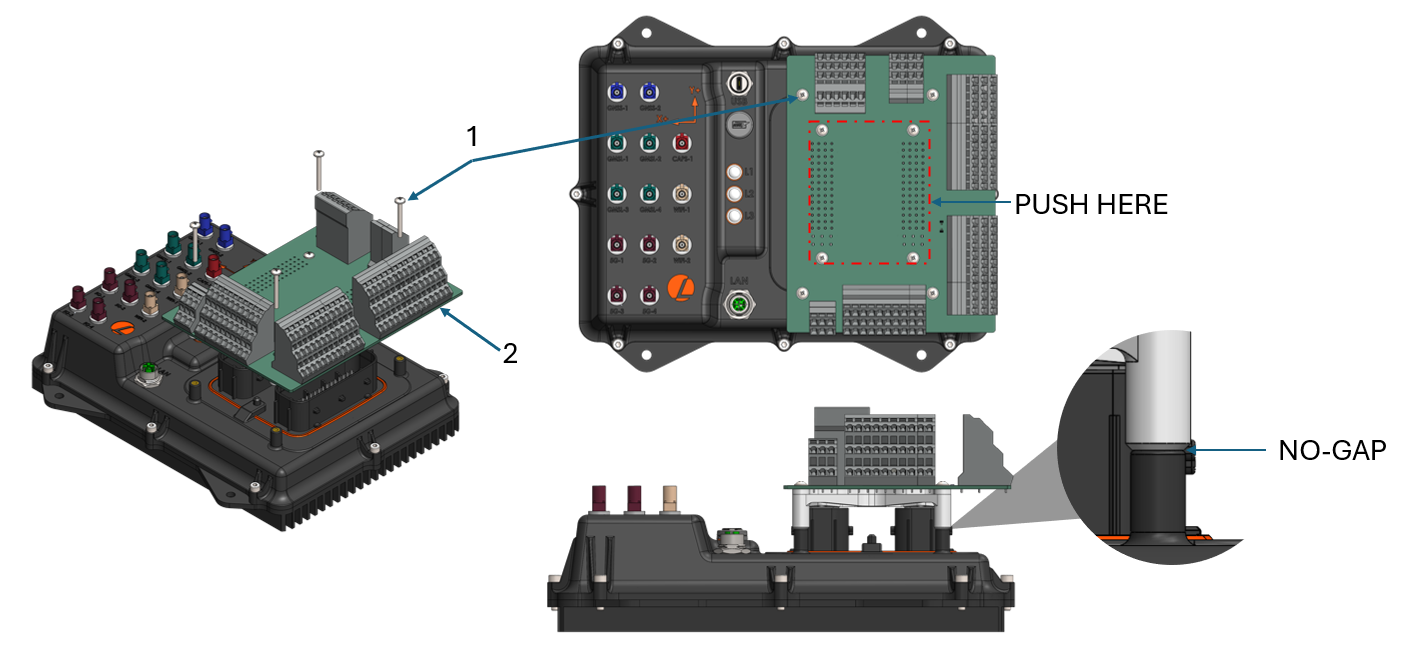
Installation
-
When installing the breakout board, first ensure that the device is powered down and remove the main connectors.
-
Align the connector and carefully push the breakout board onto the AutomatePro. Warning: Only push inside the area highlighted. Push the board down until it comes to a hard stop.
-
By hand, install all four M3 x 30 bolts [1].
-
Begin tightening the bolts in a cross-star pattern. Tighten the bolts until the part comes to a hard stop, as shown in the image.
Removal
-
Ensure that the device is powered down and remove any external connectors.
-
Using a tool, carefully loosen and remove the four M3 x 30 bolts [1].
-
Once the bolts are removed, carefully lift the breakout board off the AutomatePro. Warning: Only lift from the area highlighted to avoid damaging the connectors.