Warning Systems
Hardware
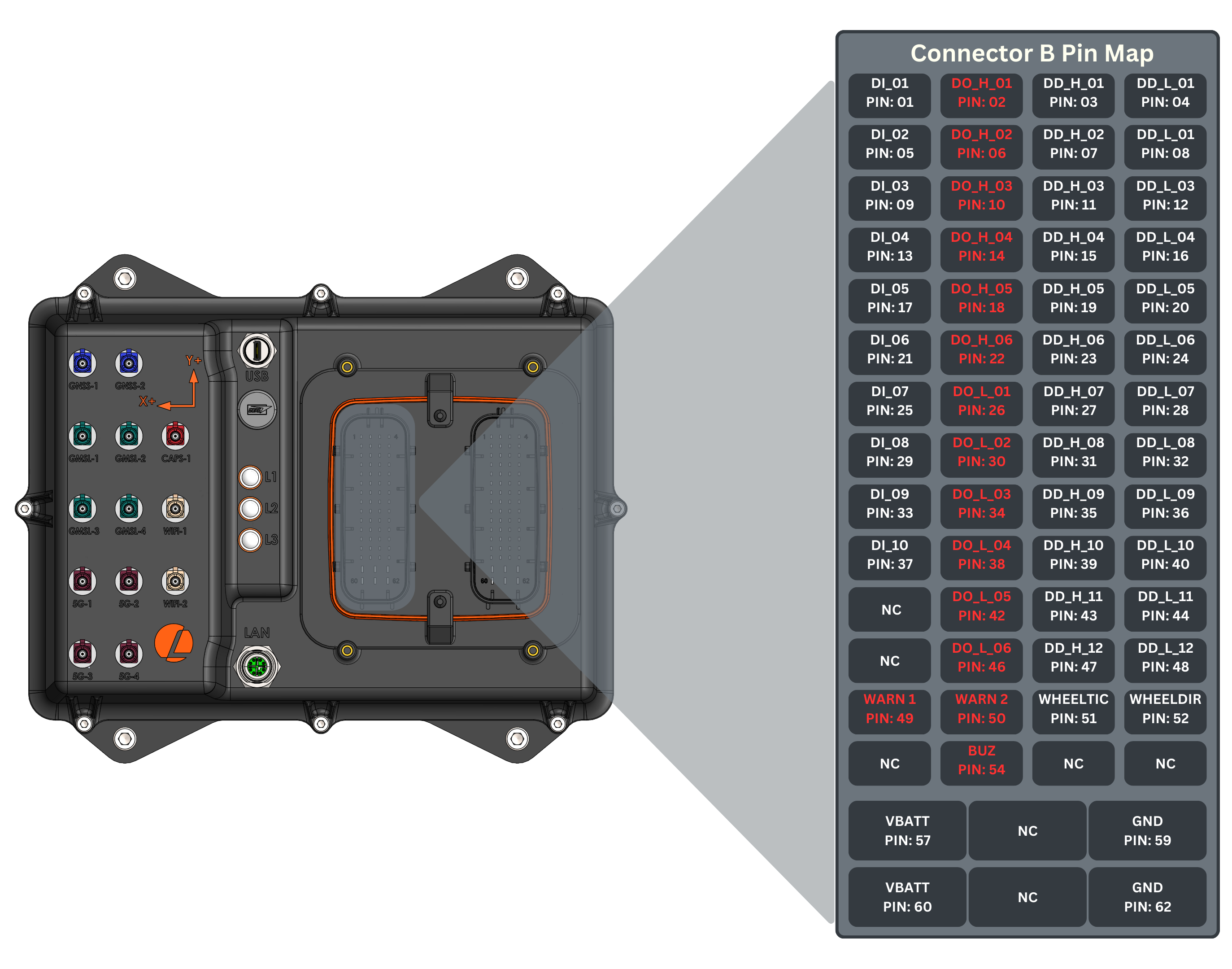
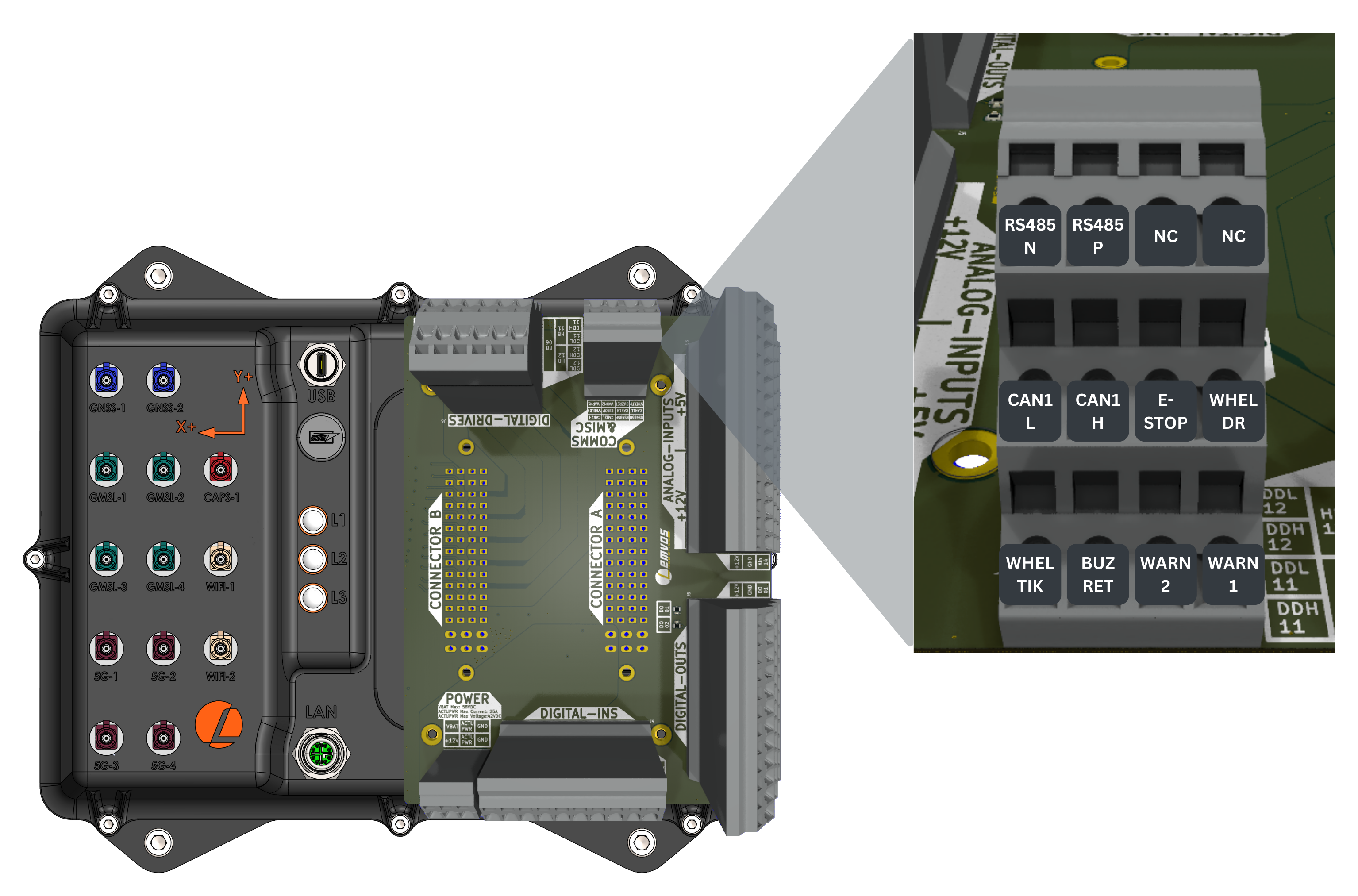
Warning system outputs are configured to control standard components such as warning lights and buzzers. Two drivers are allocated for the lighting system, and one driver is designated for a warning buzzer/horn.
Connector Pinout
- Connector
- Development Breakout Board
Warning Systems Specifications
| Parameter | Value |
|---|---|
| On-state | Sinks up to 24V |
| Drive Current | 2A |
| Controllability | ON/OFF |
| Number of Sinks | 3 |
ROS API
Subscribers
| Topic | Type | Description |
|---|---|---|
/io/warning_system_out | automatepro_interfaces/msg/WarningSystems | Publish the desired states for the warning system to this topic. Inputs: warning_system_id: Data type: uint8 (Use ENUM constants defined in the message definition. Options: WarningSystems.WARNING_BUZZER, WarningSystems.WARNING_LIGHT_01, WarningSystems.WARNING_LIGHT_02) state: Data type: bool (Use ENUM constants defined in the message definition. Options: WarningSystems.ON, WarningSystems.OFF) Response rate: 200 ms |
Example
This example switches the warning buzzer on and off every second by publishing to the /io/warning_system_out topic.
The IO controller keeps the last command it receives, so the example switches the buzzer off when you stop it with Ctrl+C; a node that is killed or crashes leaves the output in its last state.
The tutorial package is available in the AutomatePro tutorials repository, and its README explains how to build and run the examples.
- Python
- C++
Source: warning_system_out.py
import signal

import rclpy
from rclpy.duration import Duration
from rclpy.node import Node
from rclpy.signals import SignalHandlerOptions
from automatepro_interfaces.msg import WarningSystems


class WarningSystemsPublisher(Node):

    def __init__(self):
        super().__init__('warning_systems_publisher')
        self.publisher = self.create_publisher(WarningSystems, '/io/warning_system_out', 10)
        self.timer = self.create_timer(1.0, self.timer_callback)
        self.state = False

    def timer_callback(self):
        msg = WarningSystems()
        msg.warning_system_id = WarningSystems.WARNING_BUZZER
        msg.state = self.state
        self.publisher.publish(msg)
        self.get_logger().info(
            'Publishing WarningSystems: warning_system_id=%d, state=%d' %
            (msg.warning_system_id, msg.state))
        self.state = not self.state

    def switch_off(self):
        msg = WarningSystems()
        msg.warning_system_id = WarningSystems.WARNING_BUZZER
        msg.state = WarningSystems.OFF
        self.publisher.publish(msg)
        if self.publisher.get_subscription_count() == 0:
            self.get_logger().warn(
                'WARNING_BUZZER off command not delivered: no subscriber on %s'
                % self.publisher.topic_name)
            return
        if self.publisher.wait_for_all_acked(Duration(seconds=4)):
            self.get_logger().info('Switched WARNING_BUZZER off')
        else:
            self.get_logger().warn('WARNING_BUZZER off command not acknowledged')


def main(args=None):
    # The IO controller keeps the last command, so switch the buzzer off before exiting.
    rclpy.init(args=args, signal_handler_options=SignalHandlerOptions.NO)
    signal.signal(signal.SIGTERM, signal.default_int_handler)
    node = WarningSystemsPublisher()
    try:
        rclpy.spin(node)
    except KeyboardInterrupt:
        signal.signal(signal.SIGINT, signal.SIG_IGN)
        signal.signal(signal.SIGTERM, signal.SIG_IGN)
        node.switch_off()
    finally:
        node.destroy_node()
        rclpy.try_shutdown()


if __name__ == '__main__':
    main()
Run the node using the following command:
ros2 run automatepro_python_tutorials warning_system_out_node
Source: warning_system_out.cpp
#include <chrono>
#include <memory>
#include <mutex>

#include <rclcpp/rclcpp.hpp>
#include <automatepro_interfaces/msg/warning_systems.hpp>

class WarningSystemsPublisher : public rclcpp::Node
{
public:
  WarningSystemsPublisher()
  : Node("warning_systems_publisher"), state_(false)
  {
    publisher_ = this->create_publisher<automatepro_interfaces::msg::WarningSystems>(
      "/io/warning_system_out", 10);
    timer_ = this->create_wall_timer(
      std::chrono::seconds(1),
      std::bind(&WarningSystemsPublisher::timer_callback, this));
  }

  void switch_off()
  {
    std::lock_guard<std::mutex> lock(mutex_);
    stopped_ = true;
    timer_->cancel();
    auto msg = automatepro_interfaces::msg::WarningSystems();
    msg.warning_system_id = automatepro_interfaces::msg::WarningSystems::WARNING_BUZZER;
    msg.state = automatepro_interfaces::msg::WarningSystems::OFF;
    publisher_->publish(msg);
    if (publisher_->get_subscription_count() == 0) {
      RCLCPP_WARN(
        this->get_logger(), "WARNING_BUZZER off command not delivered: no subscriber on %s",
        publisher_->get_topic_name());
      return;
    }
    if (publisher_->wait_for_all_acked(std::chrono::seconds(4))) {
      RCLCPP_INFO(this->get_logger(), "Switched WARNING_BUZZER off");
    } else {
      RCLCPP_WARN(this->get_logger(), "WARNING_BUZZER off command not acknowledged");
    }
  }

private:
  void timer_callback()
  {
    std::lock_guard<std::mutex> lock(mutex_);
    if (stopped_) {
      return;
    }
    auto msg = automatepro_interfaces::msg::WarningSystems();
    msg.warning_system_id = automatepro_interfaces::msg::WarningSystems::WARNING_BUZZER;
    msg.state = state_;
    publisher_->publish(msg);
    RCLCPP_INFO(
      this->get_logger(), "Publishing WarningSystems: warning_system_id=%d, state=%d",
      msg.warning_system_id, msg.state);
    state_ = !state_;
  }

  rclcpp::Publisher<automatepro_interfaces::msg::WarningSystems>::SharedPtr publisher_;
  rclcpp::TimerBase::SharedPtr timer_;
  bool state_;
  std::mutex mutex_;
  bool stopped_{false};
};

int main(int argc, char * argv[])
{
  rclcpp::init(argc, argv);
  auto node = std::make_shared<WarningSystemsPublisher>();
  // The IO controller keeps the last command, so switch the buzzer off before shutdown.
  std::weak_ptr<WarningSystemsPublisher> weak_node = node;
  rclcpp::contexts::get_global_default_context()->add_pre_shutdown_callback(
    [weak_node]() {
      if (auto locked_node = weak_node.lock()) {
        locked_node->switch_off();
      }
    });
  rclcpp::spin(node);
  rclcpp::shutdown();
  return 0;
}
Run the node using the following command:
ros2 run automatepro_cpp_tutorials warning_system_out_node