UGV
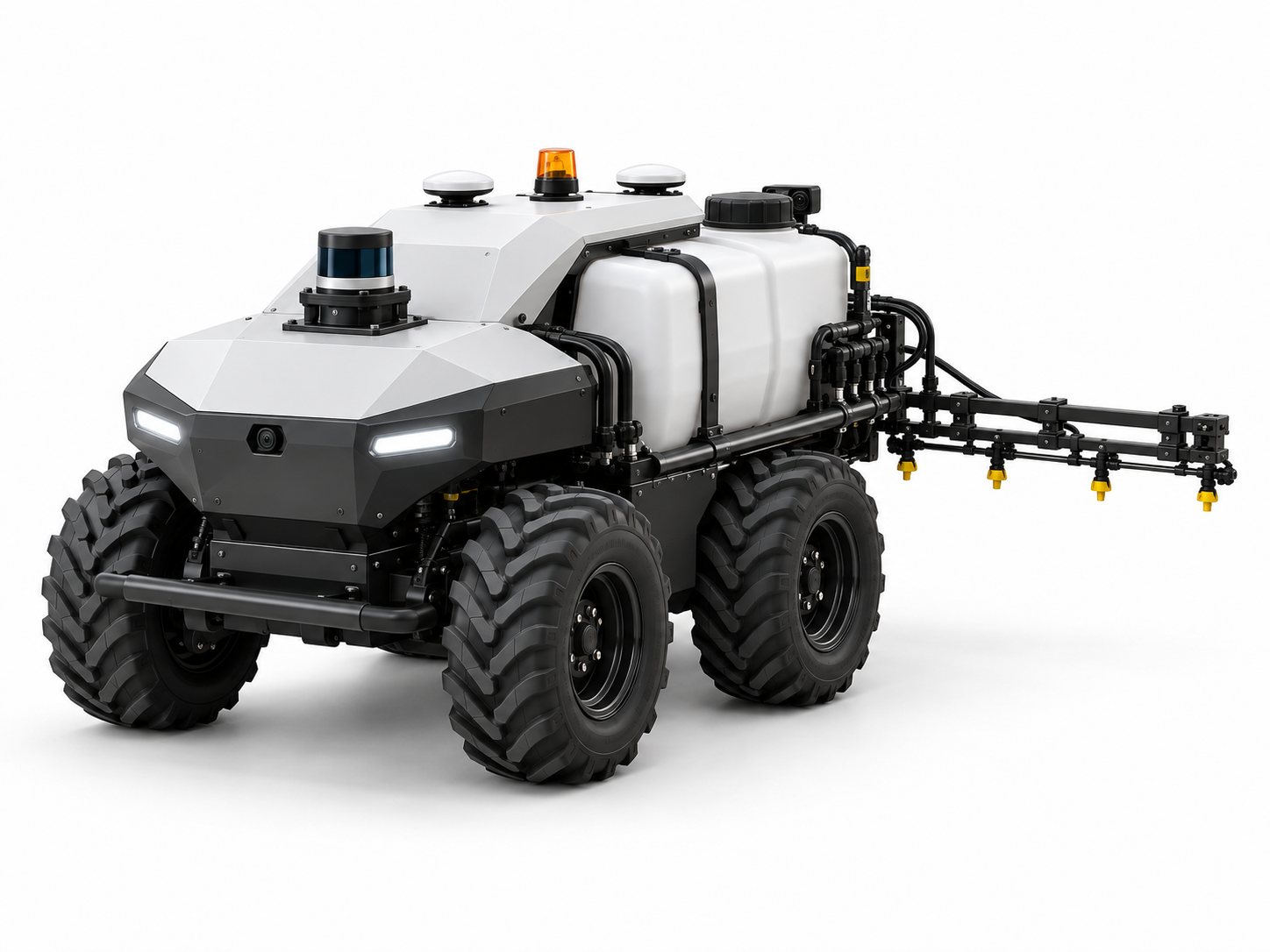
This reference design shows how AutomatePro can be used as the central compute, navigation and vehicle-control platform for an electric unmanned ground vehicle (UGV). The example uses a four-wheel skid-steer vehicle with RTK positioning and wheel-tick dead reckoning, differential GNSS heading, two 196° GMSL2 cameras for 360° coverage and a 3D LiDAR. The vehicle is operated remotely over 5G from an operator station, with onboard autonomy and obstacle detection supporting the operator.
To show how AutomatePro handles a working payload, the example vehicle carries an agricultural boom sprayer, with flow-based rate control, GNSS section control and wind monitoring all run by AutomatePro. The same approach applies to other payloads, such as mowing, inspection or material transport.
The design is intentionally kept simple. It is intended to show a practical starting architecture rather than prescribe a specific chassis, motor controller, sprayer or sensor manufacturer. Component ratings, protection and regulatory requirements should be verified for the final vehicle.
Overview
Features
The example vehicle is intended to support:
- Four-wheel skid-steer electric drive
- Remote operation over 5G with live camera video
- Supervised autonomous spraying along planned paths
- RTK GNSS positioning
- GNSS dead reckoning from the wheel tick and direction inputs
- Differential GNSS heading, available at standstill
- Spray rate control from flow and ground speed
- GNSS section control for five boom sections
- Boom height control above the crop
- Tank level and spray pressure monitoring
- Wind monitoring to limit spray drift
- Full 360° camera coverage from two 196° GMSL2 cameras
- Onboard segmentation and classification on the camera streams
- 3D LiDAR obstacle detection
- E-STOP buttons, safety bumpers and link-loss stop
- Warning beacon, remote-operation status light and buzzer
- Front and rear work lights
- 48 V nominal vehicle power system (could also be a 24 V system)
The main objective is to minimize the number of separate compute, communications and I/O modules required in the vehicle by using the functions already integrated into AutomatePro. In this design, AutomatePro also replaces a separate sprayer rate controller.
Resources
Key System Specifications
| Parameter | Value |
|---|---|
| Vehicle type | Four-wheel skid-steer electric UGV with a boom sprayer |
| Size | At least 1 m long, so the two GNSS antennas can be mounted 1 m or more apart |
| Drive | 4 × electric wheel motors on 2 × dual-channel CANopen motor controllers |
| Spray system | Tank, 24 V electric pump with flow-based rate control, boom with 5 sections and height control |
| Power system | 48 V nominal battery with CAN BMS, a 24 V DC/DC converter for the Digital Drives and the pump, and the AutomatePro onboard 12 V and 5 V outputs for sensors |
| Navigation | RTK GNSS with wheel tick dead reckoning, 9-axis IMU, differential GNSS heading |
| Cameras | 2 × 196° GMSL2, forward and rear, for full 360° coverage |
| LiDAR | 3D LiDAR over Ethernet |
| Operation | Remote operation over 5G from an operator station; local driving over Wi-Fi |
| Communications | 5G / 4G, Wi-Fi, and Bluetooth |
| Safety and warning | E-STOP buttons, front and rear safety bumpers, link-loss stop, beacon, status light, buzzer |
| Speed | Set by the drivetrain and the spray application; limit speed to suit stopping distance, video latency, sensor range and site rules |
| Endurance | Set by battery capacity and tank volume; AutomatePro draws 10–200 W depending on the connected loads |
System Overview
Block Diagram
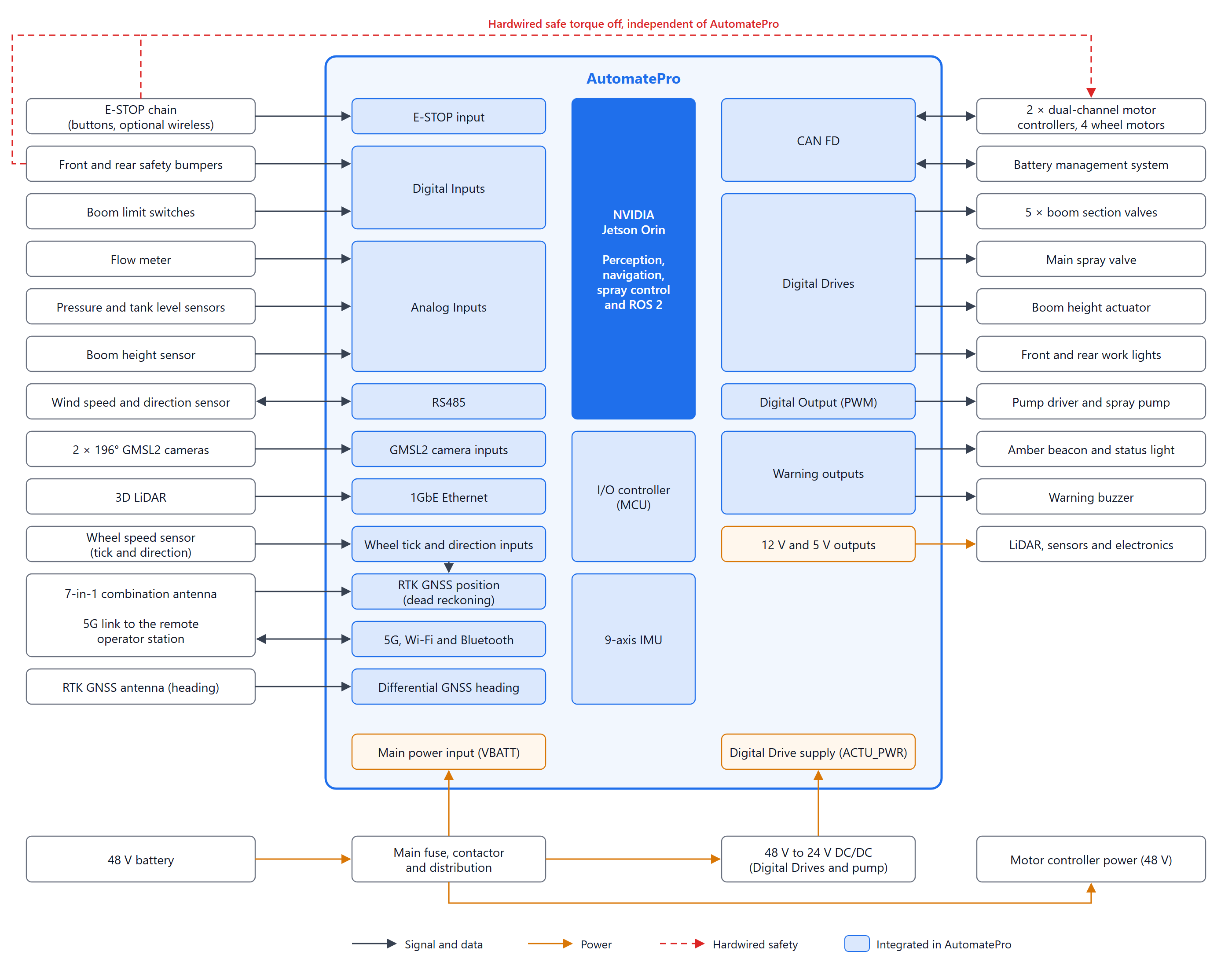
The diagram shows the functions integrated into AutomatePro inside the blue boundary and the vehicle hardware outside it.
AutomatePro Resources Used
The table shows which AutomatePro interfaces this design uses and how many remain free for additions. Channel assignments can be changed in software and in the vehicle harness. For the full product specification, see the AutomatePro System Overview.
| Interface | Available | Used | Used for |
|---|---|---|---|
| GMSL2 camera inputs | 2 | 2 | Forward and rear 196° cameras |
| CAN | 1 | 1 | Motor controllers (2), battery BMS |
| 1GbE Ethernet | 1 | 1 | 3D LiDAR |
| RS485 | 1 | 1 | Wind speed and direction sensor |
| Digital Drives | 12 half-bridges | 10 | Boom section valves (5), main spray valve (1), boom height actuator as one full bridge (2), front and rear work lights (2) |
| Digital Inputs | 10 | 4 | Front and rear bumper status (2), boom limit switches (2) |
| Digital Outputs | 12 | 1 | Pump speed, as a PWM signal to the pump driver |
| Analog Inputs | 14 | 4 | Flow meter, spray pressure, tank level, boom height |
| Warning outputs | 2 lights, 1 buzzer | 3 | Amber beacon, remote-operation status light, buzzer |
| E-STOP input | 1 | 1 | E-STOP chain monitoring |
| RTK GNSS and IMU | Integrated | Yes | Position and motion sensing |
| Differential GNSS heading | Integrated | Yes | Heading, using the second GNSS antenna |
| Wheel tick and direction inputs | Optional | Yes | Wheel speed and direction into the GNSS receiver for dead reckoning |
| 5G, Wi-Fi and Bluetooth | Integrated | Yes | Remote operation link, local driving and commissioning |
| 12 V and 5 V outputs | 12 V 8 A, 5 V 3 A | Yes | LiDAR, sensors and warning devices |
Drive System
The reference vehicle uses four electric wheel motors in a skid-steer arrangement. Two dual-channel motor controllers each drive the front and rear motor on one side, and connect to AutomatePro via CANopen. Turning is done by driving the two sides at different speeds, so no steering actuator is needed.
The motor controllers use the wheel motor encoders for speed control. Wheel speed for navigation goes to the dedicated AutomatePro wheel tick and direction inputs instead, as described in Position, Heading and Connectivity.
See CAN Bus for wiring and interface configuration.
Shared CAN Bus
AutomatePro has one CAN bus, which this design shares between the two motor controllers and the battery BMS:
- All devices must use the same bit rate. AutomatePro brings
can0up at 500 kbps by default. - Every device needs a unique node ID, and the message IDs used by the BMS must not clash with the CANopen IDs of the motor controllers.
- AutomatePro has an integrated 120 Ω termination resistor, so it should sit at one end of the bus, with a terminator at the other end.
- Check the bus load from the motor controller process data and the BMS at their configured rates.
E-STOP and Safe Torque Off
The E-STOP buttons and the safety bumpers should act on the motor controllers' safe torque off (STO) inputs through a hardwired safety circuit, independent of AutomatePro and its software. Fit at least one E-STOP button on each side of the vehicle, so one can be reached from any direction. When people work next to the vehicle, for example during commissioning or tank filling, a safety-rated wireless E-STOP can be added to the same circuit.
The state of the E-STOP chain is also wired to the AutomatePro E-STOP input so that software can monitor it, and each bumper reports its state to a Digital Input, for example through an auxiliary contact on its safety relay.
The AutomatePro E-STOP connection is an input and is not a safety-rated function. It should not be used as the only safety mechanism for stopping the drive or the sprayer. Design the safety functions to the risk assessment and the standards that apply to the application, such as ISO 13849-1 and ISO 18497 for highly automated agricultural machines, using the safety inputs of the selected motor controllers.
When the AutomatePro E-STOP input is low, AutomatePro also disables its Digital Drive outputs. With normally closed valves, this closes the main valve and all boom sections, and stops the boom height actuator. The Digital Outputs are not disabled, so the E-STOP circuit must also act on the enable input of the pump driver. See E-STOP and Digital Drive Out.
Remote Operation
The vehicle is normally driven by a remote operator, with no one on site. The operator station sends driving commands and spray missions to AutomatePro over 5G, and receives live video from the cameras, the vehicle position on a map, the spray status, and alarms. The GMSL2 camera driver already publishes H.264 compressed video, which keeps the video stream within the bandwidth of a cellular link.
- Link monitoring: the operator station sends a heartbeat with its commands. If the heartbeat stops, for example because of a coverage gap, Vehicle Control stops the vehicle, the Spray Controller closes the main valve, and the Vehicle Manager raises an alarm.
- Hold-to-drive: the operator holds a button or pedal to drive. Releasing it stops the vehicle.
- Assisted driving: obstacle detection keeps running during remote driving, so the vehicle can slow down or stop for an obstacle the operator has not seen.
- Speed limits: limit remote-driving speed to suit the video latency of the link, so the vehicle can stop within the distance the operator can see.
- Supervised autonomy: the operator can hand over to autonomous path following for spraying passes, and take back control at any time.
- Local driving: a gamepad or tablet connected over Wi-Fi can drive the vehicle on site, for example to load it onto a trailer, fill the tank or commission the vehicle.
Vehicle Control selects one command source at a time, so remote, autonomous and local commands never drive the motors together. Check 5G coverage across the fields to be sprayed; satcom can be added where coverage is poor.
The stop command from the operator station passes through the network and the AutomatePro software, so it is not a safety-rated function. The E-STOP buttons, the safety bumpers and the link-loss stop must work without it. Where the risk assessment requires a safety-rated remote stop, use a dedicated safety-rated wireless system wired into the hardwired E-STOP circuit.
Spray System
The sprayer consists of a tank, a 24 V electric pump, a main spray valve and a boom with five sections, each with its own valve and nozzles. AutomatePro measures flow, pressure, tank level and boom height on its Analog Inputs, drives the valves and the boom actuator from its Digital Drives, and sets the pump speed through the pump driver.
Rate Control
The Spray Controller keeps the application rate constant as the vehicle speed changes. It calculates the target flow from the application rate, the ground speed from GNSS and the width of the open boom sections:
Target flow (L/min) = application rate (L/ha) × speed (km/h) × open boom width (m) ÷ 600
For example, 200 L/ha at 6 km/h over a 3 m boom needs 6 L/min. The controller compares the target with the flow meter reading and adjusts the pump speed, with a PWM signal from a Digital Output to the pump driver.
The flow meter and the pressure sensor connect to Analog Inputs, using sensors with a 0–10 V output. Inputs for 4–20 mA sensors are available on request. The Analog Inputs sample at 33 Hz, which is enough for a rate-control loop running at a few hertz. The pressure reading is also used to detect blocked nozzles, an empty tank or a failed pump.
See Analog Input and Digital Out.
Section Control
Each boom section has a normally closed 24 V valve on a Digital Drive, behind a main spray valve on another Digital Drive. Using the RTK position and the boom geometry, the Spray Controller closes a section where it would overlap an area that is already sprayed, or cross into an area that must not be sprayed, such as a field edge, a buffer zone next to water, or a headland. It also records an as-applied map for the operator.
The AutomatePro outputs have a software response time of up to 200 ms, and each valve needs time to open or close. At 6 km/h, 200 ms is about 33 cm of travel. The Spray Controller should therefore switch each section ahead of the boundary, by the measured output and valve delay at the current speed.
Each Digital Drive supplies up to 5 A, which suits typical section valves. See Digital Drive Out.
Boom Height
A reversible 24 V linear actuator raises and lowers the boom, and an ultrasonic sensor on the boom measures its height above the crop on an Analog Input. The Spray Controller holds the boom at the height the nozzles need, which keeps the spray pattern even and reduces drift. Upper and lower limit switches on Digital Inputs stop the actuator at the ends of its travel. The boom is raised for transit and on headland turns.
Tank and Wind Monitoring
A tank level sensor on an Analog Input lets the Spray Controller estimate the remaining sprayable area, and warn the operator before the tank runs empty. An ultrasonic wind sensor on the RS485 bus, typically using Modbus RTU, measures wind speed and direction. The Spray Controller pauses spraying and alerts the operator when the wind is above the limit set by the product label or local rules.
See RS485.
Lighting and Warning
AutomatePro has dedicated warning outputs for two lights and a buzzer:
- Amber beacon — shows that the vehicle is powered and may move
- Remote-operation status light — shows when the vehicle is being driven remotely or autonomously
- Buzzer — sounds before the vehicle starts moving and before spraying starts
The warning outputs switch their loads to ground and are suitable for 12 V devices supplied from the onboard 12 V output. See Warning Systems.
Front and rear LED work lights run from Digital Drives, so the software can switch them on for spraying at dusk or at night, when wind is often lower, and when the cameras need more light.
Cameras and Perception
The reference design uses two 196° GMSL2 cameras connected directly to AutomatePro, one facing forward and one aft. Together, they give the remote operator a full 360° view, and provide the coverage for obstacle detection and recording.
Mount the cameras high enough to see over the crop and the boom, with unobstructed views and overlapping coverage on both sides of the vehicle. For remote driving, include part of the vehicle in the forward view so the operator can judge clearances.
Segmentation and classification models can run directly on the NVIDIA Jetson in AutomatePro to detect people, animals, vehicles, obstacles and crop rows onboard.
GMSL2 provides a robust, low-latency connection with Power over Coax.
See GMSL2 Camera.
LiDAR
A 3D LiDAR connects directly to the AutomatePro 1GbE port. It gives accurate range to obstacles in all lighting conditions, and its detections are fused with the camera detections into the obstacle map used for navigation. Check that the selected LiDAR provides a Linux or ROS 2 driver, and mount it where spray mist and dirt are least likely to reach the window.
The AutomatePro Ethernet port does not provide PoE, so the LiDAR needs its own power supply. It can be supplied from the onboard 12 V output when the power budget permits. Use the M12x to RJ45 Cable for a LiDAR with an RJ45 interface box, or the M12x to M12x Cable for a LiDAR with an M12 X-coded connector.
AutomatePro has one Ethernet port. To connect more Ethernet devices, such as a second LiDAR, add an IP67 Ethernet switch. See Ethernet for the network interface specification.
Position, Heading and Connectivity
RTK GNSS, IMU, cellular and local wireless connectivity can be integrated directly in AutomatePro, reducing the number of separate modules that need to be packaged and wired in the vehicle.
For this reference design:
- RTK GNSS provides global position for navigation and section control.
- The integrated IMU provides angular-rate and acceleration measurements.
- Differential GNSS heading gives the vehicle's heading even when it is standing still, so the vehicle knows which way it faces before it starts moving. It also avoids relying on the magnetometer, which the drive motors and a steel chassis can disturb.
- The two GNSS antennas are mounted at least 1 m apart, for example along the vehicle centerline, with a clear view of the sky and away from the LiDAR.
- A wheel speed sensor connects to the AutomatePro wheel tick and direction inputs, which feed the RTK GNSS receiver directly. The receiver combines wheel speed with GNSS for dead reckoning, so it keeps a position estimate through short GNSS outages, for example under tree lines or next to buildings. Skid-steer wheels slip when turning, so dead-reckoning accuracy is lower in tight turns.
- The wheel tick and direction inputs are a non-standard option that uses the u-blox F9R receiver. Contact Lemvos when ordering.
- RTK correction data is received from a correction service over the cellular or Wi-Fi connection.
- 5G provides the remote operation link, carrying commands, video and telemetry.
- Wi-Fi provides local driving, commissioning and service.
Related documentation:
Power Architecture
The reference vehicle uses a 48 V nominal battery with a battery management system (BMS) that reports its state over CAN.
AutomatePro accepts a recommended supply range of 15.5–58 VDC, so the maximum charge voltage of the battery must stay within this range. For example, a 15-cell LiFePO4 pack (54.75 V maximum) or a 13-cell lithium-ion pack (54.6 V maximum) fits, but a 16-cell LiFePO4 pack (58.4 V maximum) exceeds the recommended range.
A practical power arrangement is:
| Rail | Typical loads |
|---|---|
| 48 V nominal drive bus | Motor controllers, through the main fuse and contactor |
| AutomatePro main input | Direct from the 48 V bus, through its own fuse |
| 24 V from a DC/DC converter | Spray pump through the pump driver, and ACTU_PWR for all Digital Drive loads: section valves, main valve, boom height actuator and work lights |
| AutomatePro onboard 12 V output | LiDAR, warning devices, and 12 V sensors and electronics, up to 8 A in total |
| AutomatePro onboard 5 V output | 5 V sensors and electronics, up to 3 A |
The 48 V battery is above the recommended ACTU_PWR range of 7–42 V, so the Digital Drives get their own 24 V supply. Size the DC/DC converter for the pump, the valves, the boom actuator stall current and the work lights together, and keep each Digital Drive within its 5 A limit.
The block diagram intentionally omits individual fuses, precharge circuits, isolation, distribution blocks and protective devices to keep the reference architecture readable. These must be sized and added for the final vehicle design.
Software Architecture
A simple ROS 2 software structure for this vehicle could separate the system into the following main functions:
- Localization fuses the dead-reckoned RTK GNSS position, GNSS heading and IMU, for example with an extended Kalman filter.
- Obstacle fusion combines the camera and LiDAR detections with the vehicle position into a costmap.
- Navigation & Autonomy plans and follows spraying passes through the costmap, for example with Nav2, and passes the planned application rates to the Spray Controller.
- Spray Controller runs rate control, section control and boom height control, pauses spraying in high wind, and records the as-applied map.
- Vehicle Control turns velocity commands into left and right wheel speeds, selects between remote, autonomous and local commands, and stops the vehicle if the operator link is lost.
- Vehicle Manager watches the E-STOP, bumpers, battery and operator link, limits speed or stops the vehicle when needed, drives the warning devices and raises alarms to the operator. It works alongside the hardwired safety circuit, not instead of it.
AutomatePro includes ROS 2 drivers for supported onboard sensors and I/O, allowing application software to interact with the system without implementing low-level hardware drivers from scratch.
Optional Extensions
The architecture can be expanded without changing the basic system concept. Examples include:
- Camera-based spot spraying, with downward-facing cameras over the boom on Ethernet
- Additional LiDARs or Ethernet cameras through an IP67 Ethernet switch
- Individual nozzle control, using the spare Digital Drives and Digital Outputs or a CAN nozzle controller
- Tank rinse and agitation control
- Ultrasonic or radar proximity sensors over CAN
- Higher compute options for heavier perception models
- Satcom, such as Starlink or Eutelsat OneWeb
- Docking, automatic charging and automatic tank filling
- Safety-rated wireless E-STOP for on-site work
For larger vehicles or higher-power sprayers, external contactors, motor drives and protected power-distribution modules should be used, with AutomatePro providing commands, sensing and supervisory control.
To discuss any of these extensions or a higher-power configuration for your vehicle, contact Lemvos.
System Components
Lemvos Products
| Product | Part number | Qty | Role in this design |
|---|---|---|---|
| AutomatePro | AMP10-NO08-5G1-WIFI1-GMSLA-SSD1-RTKH-AIN1-NA | 1 | Central compute, navigation, vehicle control and spray control; order with the wheel tick and direction option |
| Sony ISX031 GMSL2 Monocular Camera | AMP-1003-196F | 2 | Forward and rear 196° cameras for 360° coverage |
| Camera Mount / Feed-Through / Shade | AMP-1011 | 2 | Sealed camera mounting through the body panels |
| FAKRA Type Z Camera Cables | AMP-1007 | 2 | Camera connections to the GMSL2 inputs |
| 7-in-1 Combination Antenna | AMP-1001-3M | 1 | 5G, Wi-Fi, Bluetooth and RTK GNSS positioning |
| RTK GNSS Antenna | AMP-1002-3M | 1 | Second GNSS antenna for differential heading |
| M12x to RJ45 Cable | AMP-1006-2M | 1 | Ethernet connection to the LiDAR |
| Main Connector and Crimp Kit | AMP-1009 | 1 | Vehicle wiring harness |
Third-Party Components
Third-party components are described by type, so the design can be adapted to different vehicle sizes and suppliers. Lemvos can help you narrow down and select suitable components for your application. Contact Lemvos to discuss your requirements.
| Component | Requirement | Qty |
|---|---|---|
| Motor controllers | Dual-channel CANopen motor controller with encoder feedback and safe torque off input | 2 |
| Wheel motors | Electric wheel motors with encoders, matched to the motor controllers | 4 |
| Wheel speed sensor | Pulse output for wheel ticks and a direction signal, 5–24 V, for example from a wheel-mounted encoder | 1 |
| Vehicle battery | 48 V nominal with CAN BMS, with maximum charge voltage within the AutomatePro input range | 1 |
| Main fuse and contactor | Rated for the drive current, with precharge where the motor controllers need it | 1 |
| DC/DC converter | 48 V to 24 V, rated for the pump and the Digital Drive loads | 1 |
| 3D LiDAR | Ethernet LiDAR with a Linux or ROS 2 driver | 1 |
| Emergency stop buttons | Latching E-STOP buttons, at least one on each side, wired to the safety circuit and the AutomatePro E-STOP input | 2 |
| Safety bumpers | Front and rear safety edges with a safety relay acting on the motor controller STO inputs | 2 |
| Operator station | PC with driving controls, video display and network access to the vehicle over 5G | 1 |
| Spray tank | Sized to the vehicle payload, with fill, drain and agitation provisions | 1 |
| Spray pump | 24 V electric diaphragm pump, rated for the required flow and pressure | 1 |
| Pump driver | 24 V DC motor driver with a PWM speed input and an enable input wired to the E-STOP circuit | 1 |
| Flow meter | 0–10 V output, or 4–20 mA with the matching AutomatePro input option | 1 |
| Pressure sensor | 0–10 V output, rated for the spray line pressure | 1 |
| Tank level sensor | 0–10 V output, hydrostatic or ultrasonic | 1 |
| Main spray valve | 24 V normally closed valve, within the 5 A Digital Drive limit | 1 |
| Boom section valves | 24 V normally closed valves, within the 5 A Digital Drive limit | 5 |
| Spray boom | Boom with nozzles in 5 sections | 1 |
| Boom height actuator | 24 V reversible linear actuator | 1 |
| Boom limit switches | Upper and lower limit switch or proximity sensor | 2 |
| Boom height sensor | Ultrasonic distance sensor with 0–10 V output | 1 |
| Wind sensor | Ultrasonic wind speed and direction sensor with RS485 Modbus RTU | 1 |
| Work lights | 24 V LED, front and rear | 2 |
| Warning beacon | 12 V amber beacon | 1 |
| Status light | 12 V light showing remote or autonomous operation | 1 |
| Buzzer | 12 V warning buzzer | 1 |